
Redis is one of the easiest databases to get started with and one of the easiest to misuse in production. Teams reach for it early, lean on it heavily, and then discover its limits at the worst possible time — during a traffic spike or an outage.
This article covers what Redis is actually good at, what it is not, and the specific mistakes that cause production incidents.
What Redis Is
Redis is an in-memory data store. Everything lives in RAM. That is why it is fast — sub-millisecond reads and writes are normal.
It supports a handful of data structures:
- Strings
- Hashes
- Lists
Production Redis: A Practical Guide
Redis is one of the easiest databases to get started with and one of the easiest to misuse in production. Teams reach for it early, lean on it heavily, and then discover its limits at the worst possible time — during a traffic spike or an outage.
This is not a getting-started guide. It is a production guide. It covers what Redis is actually good at, how it fails, the specific mistakes that cause incidents, and how to run it correctly once it is load-bearing in your stack.
What Redis Actually Is
Redis is an in-memory data store. Everything lives in RAM. That is why reads and writes are fast — sub-millisecond response times are normal under typical load. It supports a small set of data structures: strings, hashes, lists, sets, sorted sets, bitmaps, and hyperloglogs. Each structure maps to a specific class of problem.
Redis is not a general-purpose database. It has no concept of joins, no schema, no foreign keys, and no complex query language. What it has is speed — and a set of atomic operations on those data structures that make certain problems elegant to solve.
The engineers who use Redis well treat it as a specialised tool for a specific layer of their stack. The engineers who misuse it treat it as a fast Postgres.
What Redis Does Well
Caching Expensive Query Results
This is the canonical Redis use case and the one it was built for. The pattern is straightforward: before hitting your primary database, check Redis for a cached result. On a hit, return it. On a miss, query the database, write the result to Redis with a TTL, and return it.
The result is that your database sees only cache misses — a fraction of your total request volume — instead of every request. For read-heavy applications with repeated queries on the same data, this can reduce database load by an order of magnitude.
The key discipline here is TTL management. Every cached key should have a TTL that reflects how stale the data can acceptably be for your use case. A user’s profile might tolerate a 5-minute TTL. A product’s real-time stock count should not be cached at all, or cached for a few seconds at most. TTL is not a performance knob — it is a correctness constraint.
Session Storage
HTTP is stateless. Web applications need to store session state somewhere. Redis is the correct answer for most teams.
The alternative — storing sessions in your relational database — generates a high volume of small, frequent, low-value reads and writes on a database that should be reserved for your application data. Sessions create table bloat, increase vacuum pressure in Postgres, and add unnecessary latency on every authenticated request.
Redis handles sessions well because they are short-lived (TTL handles cleanup automatically), small in size (a session is typically a user ID and some flags, not a complex object), and do not require durability guarantees (losing a session means a user has to log in again, not data corruption).
Every major web framework has a Redis session adapter. Use it.
Rate Limiting
Redis’s atomic INCR and EXPIRE commands make sliding-window rate limiters straightforward to implement. The pattern: on each request, increment a key namespaced by user ID and time window, set an expiry on first creation, and reject if the count exceeds the limit.
This is fast, accurate, and scales to high throughput. Implementing rate limiting in Postgres — with a row per user per window — works at small scale but adds write pressure and latency at high QPS. Redis handles this natively.
Real-Time Counters and Leaderboards
Sorted sets are one of Redis’s most powerful data structures. You can insert a member with a score, update scores atomically, and query the top N members or a member’s rank in constant or log time. Building a leaderboard in Postgres requires aggregation queries and careful indexing; in Redis it is three commands.
Counters — page views, like counts, download counts — are similarly well-suited to Redis. The INCR command increments a key atomically. No transactions, no row locking, no contention.
Pub/Sub and Simple Queues
Redis supports publish/subscribe messaging and a basic queue pattern via lists. For simple real-time notifications or lightweight task queues, this can be sufficient. For anything requiring durability, retry logic, dead-letter queues, or guaranteed delivery, use a proper message queue (RabbitMQ, Kafka, or a managed equivalent) instead.
The Mistakes That Cause Production Incidents
Treating Redis as a Database of Record
This is the most dangerous mistake and the most common one at early-stage teams.
Redis is in-memory by default. If the Redis process restarts and persistence is not correctly configured, data is gone. Teams discover this after a deploy, a crash, or an instance replacement and find that their application is missing data they assumed was durable.
Redis has two persistence mechanisms: RDB snapshots (periodic point-in-time snapshots to disk) and AOF logging (append-only file that logs every write). Both add latency and operational complexity. Neither provides the same durability guarantees as a transactional database designed for durability from the ground up.
The correct mental model: if losing this data right now would cause your application to behave incorrectly in a way that is not recoverable, the data belongs in Postgres or object storage, not Redis. Sessions can be lost so users have to log in again. Rate limit counters can be lost a few requests slip through. Order records cannot be lost. User account data cannot be lost.
Not Setting TTLs on Every Key
Every key written to Redis should have a TTL unless you have a documented, explicit reason for it not to. Without TTLs, Redis memory grows indefinitely. When memory fills:
- If your eviction policy is noeviction, Redis starts returning errors on write commands. Your application starts failing.
- If your eviction policy is allkeys-lru or similar, Redis starts evicting keys. If those keys are not cache entries but data your application expects to be there, behaviour becomes unpredictable.
The correct defaults: use allkeys-lru as your eviction policy for a cache. Set TTLs on every key. Monitor memory usage and alert before it reaches capacity.
A common anti-pattern: developers set a key and forget the TTL during initial development. The key works correctly. It goes to production. Over months it accumulates thousands of similar keys with no expiry. Memory grows. The problem is invisible until it is not.
Storing Large Objects
Redis is fast because everything is in memory, and memory is expensive — significantly more expensive per gigabyte than disk or object storage. Storing large objects in Redis defeats both advantages: it consumes expensive memory for data that does not benefit from sub-millisecond access latency.
Images, videos, large documents, serialised objects measured in megabytes — these do not belong in Redis. They belong in object storage. S3-compatible object storage costs a small fraction of Redis memory per gigabyte and is designed for exactly this use case. Store the object in object storage, store the key or URL in Postgres, and cache only the metadata or URL in Redis if needed.
A practical heuristic: if a Redis value exceeds 10KB, question whether it should be there. If it exceeds 100KB, it almost certainly should not.
Running Without Replication
A standalone Redis instance with no replication is a single point of failure. When the instance goes down — due to hardware failure, OOM kill, OS update, or a bad deploy — every part of your application that depends on Redis goes down with it. For a cache, this means a thundering herd against your database. For session storage, this means every logged-in user is logged out simultaneously.
For production use, run Redis in at minimum a primary-replica configuration:
Redis Sentinel monitors the primary and replicas, detects failures, and promotes a replica to primary automatically. Your application connects to Sentinel for the current primary address. Failover typically takes 10–30 seconds.
Redis Cluster shards data across multiple nodes, each with its own replicas. This provides both high availability and horizontal scale. It is more operationally complex than Sentinel and is the right choice when you need to shard data, not just fail over.
For most startups at seed and Series A stage, a managed Redis service with automatic failover is the right default. The operational overhead of running your own Sentinel or Cluster is significant, and the cost premium for managed Redis is justified.
Cache Stampede
A cache stampede — also called a thundering herd — occurs when a popular cached key expires and many concurrent requests simultaneously experience a cache miss. All of them query the database at the same time. Database load spikes. Latency increases. In severe cases, the database becomes overwhelmed and falls over.
This is particularly dangerous for keys that are both very popular and expensive to regenerate — a homepage feed, a trending content list, or a computed analytics result.
Two mitigations:
Probabilistic early expiration: Start refreshing a key slightly before it expires, based on a probability function that increases as the TTL approaches zero. Only one request triggers the refresh; the rest continue to serve the existing cached value. Libraries like python-cache-stampede implement this pattern.
Mutex on cache miss: When a cache miss occurs, acquire a lock before querying the database. If another request already holds the lock, wait and then re-check the cache — the first request will have populated it. This ensures only one request hits the database per cache miss, regardless of concurrency.
Most production caching libraries have configuration options for one or both of these patterns. Enable them for high-traffic keys.
Missing Monitoring
Redis exposes a rich set of metrics via the INFO command and the MONITOR command. Teams that run Redis without monitoring discover problems reactively ,during incidents rather than proactively.
The metrics that matter in production:
- used_memory vs maxmemory: How close you are to the memory limit. Alert at 75%.
- evicted_keys: If this is non-zero and your data is not a pure cache, you have a problem.
- keyspace_hits vs keyspace_misses: Your cache hit rate. A consistently low hit rate means your TTLs are too short or your key strategy is wrong.
- connected_clients: Connection pool exhaustion causes latency spikes.
- instantaneous_ops_per_sec: Throughput baseline for anomaly detection.
- slowlog: Commands that took longer than a threshold. A single KEYS * command in production will block Redis for seconds.
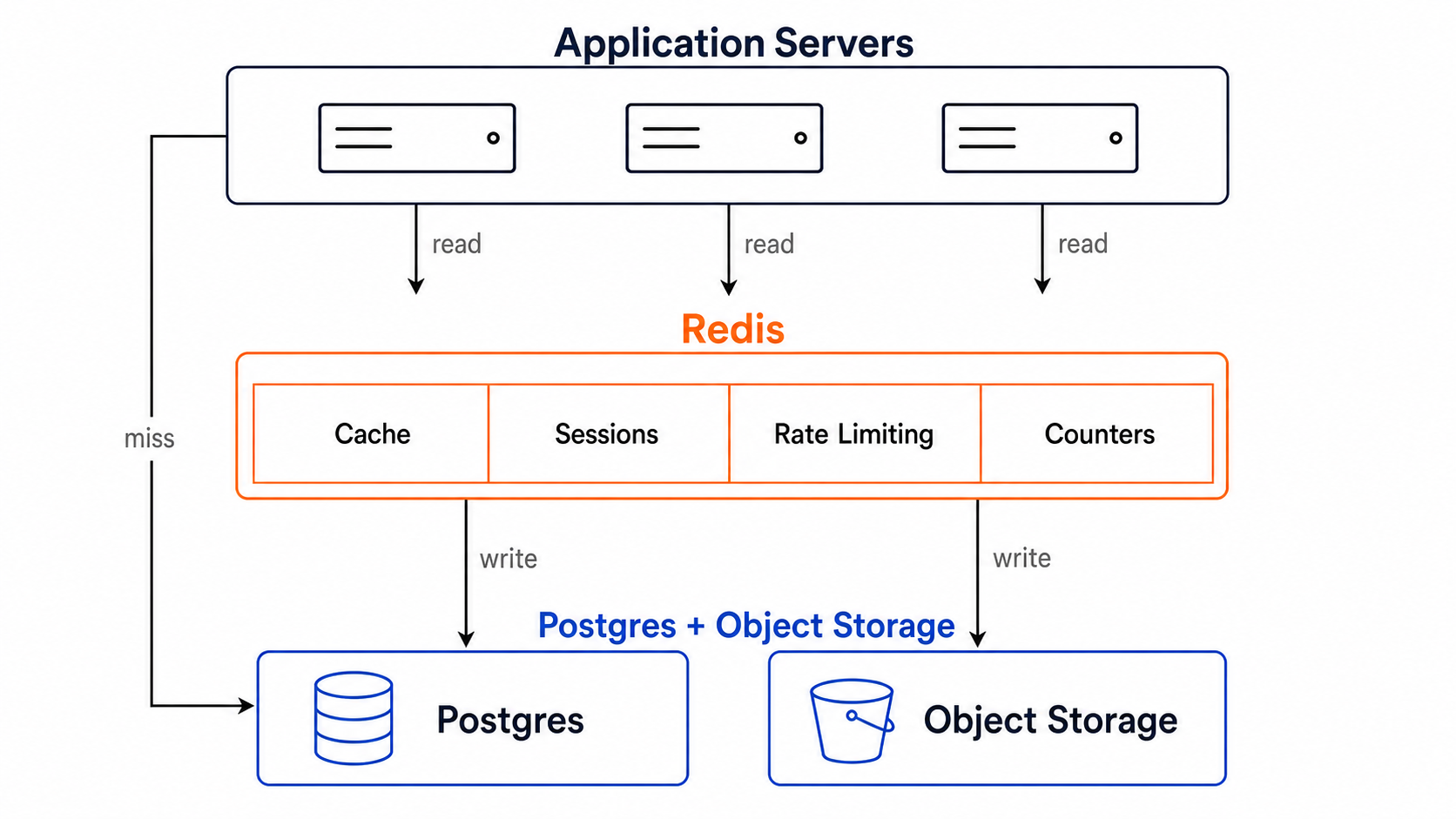
Redis cache layer between apps and storage.
The Commands That Will Hurt You in Production
KEYS *: This command scans the entire keyspace and blocks Redis while it runs. In development with a few hundred keys it is instant. In production with millions of keys it will freeze Redis for seconds. Use SCAN for iterative keyspace inspection instead.
FLUSHALL / FLUSHDB: These delete all keys in the database. There is no undo. Add monitoring alerts and access controls to prevent accidental execution in production. Consider using ACLs to restrict these commands to admin users only.
Large LRANGE or SMEMBERS on unbounded collections: Reading an entire list or set with thousands or millions of members in a single command blocks Redis. Always bound your reads. Use pagination patterns for large collections.
Running Redis in Production: The Checklist
Before considering Redis production-ready, verify each of these:
- Every key has a TTL, or the reason for no TTL is explicitly documented
- Eviction policy is configured and appropriate for the use case
- Replication is configured — at minimum one replica, with Sentinel for automated failover
- maxmemory is set — Redis will not limit its own memory without this
- Persistence is configured appropriately — RDB for tolerable point-in-time recovery, AOF for lower data loss
- KEYS * is blocked or restricted via ACLs
- Memory usage is monitored with alerts before capacity is reached
- Slow log threshold is configured and reviewed periodically
- Application code handles Redis unavailability gracefully — cache miss fallback to the database, not a hard failure
The Right Mental Model
Redis is a fast, temporary layer that sits in front of your durable systems. It accelerates reads by serving cached data. It handles stateful-but-ephemeral data like sessions. It powers real-time features that require sub-millisecond response times.
The test for every piece of data in Redis: if this data disappeared right now, would the application recover gracefully?
If the answer is yes — the application falls back to the database on a cache miss, users log in again, rate limit counters reset — the data belongs in Redis. If the answer is no — the data is the only copy of something critical — it belongs in Postgres or object storage, with Redis as an optional acceleration layer on top.
Redis does not replace your database. It makes your database faster by handling the requests your database should not have to answer.