
What Lifecycle Policies Do
S3 lifecycle policies are rules that automatically act on objects in a bucket based on their age, prefix, or tags. They can delete objects after a specified number of days, transition objects to cheaper storage classes, expire previous object versions, and clean up incomplete multipart uploads.
Lifecycle policies require no application code changes. They run server-side on a schedule set by the rule. Once configured, they reduce storage costs automatically every day without requiring anyone to remember to run a cleanup job.
For most Indian engineering teams, implementing the six policies described in this guide will reduce the cloud storage bill by 20 to 40 percent within the first billing cycle. The savings are not from cutting useful data — they are from stopping the accumulation of objects that nobody would miss.
How to Apply Policies on S3-Compatible Storage
Lifecycle policies are applied to buckets via the S3 API using the AWS CLI. The command structure is the same on AWS S3 and on IBEE: you pass a JSON file containing one or more lifecycle rules to the put-bucket-lifecycle-configuration command, with the --endpoint-url flag pointing at IBEE's endpoint. The lifecycle JSON format is identical across both platforms, which means any policy configured on AWS S3 can be copied directly to IBEE without modification.
Policy 1 — Abort Incomplete Multipart Uploads
Every team that accepts file uploads has this cost lurking in their bill, and most do not realise it until they look.
When a multipart upload is initiated but not completed mainly because of a client error, a network interruption, or a crash during upload cause the uploaded parts remain in storage and continue to be billed indefinitely. They do not appear in normal bucket listings, so they accumulate invisibly. In buckets that have been running for more than six months without this policy, the incomplete upload backlog often accounts for 5 to 15 percent of the total bucket storage cost.
The policy rule sets AbortIncompleteMultipartUpload with a DaysAfterInitiation value of 7. Any multipart upload that has not been completed within 7 days of being initiated is automatically aborted and its parts are deleted. The rule is applied with the Filter field left empty so it covers the entire bucket.
This is the highest-priority lifecycle policy to implement because the savings are pure waste elimination: no application changes, no data loss risk, no tradeoffs. Apply it to every bucket that accepts uploads.
Policy 2 — Expire Application Logs After 90 Days
Application logs, access logs, and audit logs accumulate without bound if no expiry policy is set. For most Indian businesses, the relevant regulatory requirement is CERT-In's 180-day retention mandate for IT system logs. Beyond that, most logs have diminishing operational value after 30 to 90 days.
The policy rule uses an Expiration action with Days set to the appropriate retention period, and a Filter with a Prefix matching your log storage path, for example logs/ or access-logs/. For CERT-In-regulated entities, set the expiry to 180 days. For application debug logs with no regulatory requirement, 30 days is typically sufficient. For audit logs used in incident response, 90 days is a reasonable default that covers most post-incident review windows.
Adjust the prefix to match your actual log storage structure. If logs from different systems go to different prefixes, create one rule per prefix with the appropriate retention period for each.
Policy 3 — Clean Up Old CI/CD Build Artifacts
CI/CD pipelines write build artifacts, test reports, and deployment packages to object storage on every run. Without an expiry policy, these accumulate indefinitely. A team running 50 builds per day, each producing 200 MB of artifacts, generates 3 TB of artifact storage per month, at Rs.4,500 per month on IBEE at Rs.1.50 per GB ($0.016/GB/month). All USD equivalents in this article use a conversion rate of Rs.94.91 per dollar as of May 2026. Twelve months of that, unmanaged, is Rs.54,000 spent on artifacts nobody will ever retrieve.
The policy rule sets Expiration with Days at 14 and a Filter with Prefix pointing to your artifact storage path, for example builds/ or artifacts/. Retain only as many days of build artifacts as your incident response and rollback process genuinely requires. Most teams need 7 to 14 days. Thirty days is a conservative upper bound for teams with long release cycles.
Policy 4 — Expire Temporary Processing Files
Data pipelines, image processing queues, transcoding workflows, and batch jobs often create intermediate files in object storage. These temporary files should be cleaned up after the processing pipeline completes, but if the cleanup step is skipped due to a pipeline failure or an unhandled exception, they accumulate at the rate of every failed job.
The policy rule sets Expiration with Days at 3 and a Filter with Prefix covering your temporary file paths. Organise all temporary pipeline output under a consistent prefix such as tmp/, processing/, or staging/ so a single lifecycle rule covers the entire category. Any temporary file that has not been cleaned up by the application within 3 days is almost certainly from a failed job and safe to delete.
We have seen teams discover tens of gigabytes of orphaned processing files from pipeline failures that happened months earlier. None of it was recoverable or needed. All of it was costing money every month.
Policy 5 — Expire Non-Current Object Versions
If bucket versioning is enabled — which it should be on any bucket holding important data — every overwrite creates a new current version and retains the previous version as a non-current version. Without a version expiry policy, previous versions accumulate indefinitely. For buckets with frequent writes, this can double or triple the apparent storage cost over time.
The policy rule uses NoncurrentVersionExpiration with NoncurrentDays set to 30. This retains the previous 30 days of non-current versions for recovery from accidental overwrites, and automatically deletes versions older than 30 days. For buckets with very high write frequency, reducing this to 7 days still provides a meaningful recovery window at significantly lower storage cost. For compliance-sensitive buckets where a longer version history is required, increase it accordingly.
Policy 6 — Delete Expired Delete Markers
When a versioned bucket has an object deleted, S3 creates a delete marker rather than immediately removing the object. If the object's non-current versions are later expired by Policy 5, the delete marker becomes an expired delete marker: it no longer points to any content, but it continues to occupy an entry in the bucket listing.
In heavily used versioned buckets, expired delete markers accumulate in the thousands and make bucket listings slower and more expensive to paginate. The policy rule sets ExpiredObjectDeleteMarker to true, which instructs the storage layer to automatically remove delete markers that have no associated object versions remaining.
The cost impact of this policy is marginal in most cases, but the operational hygiene benefit is meaningful: bucket listings stay clean, list operation costs stay predictable, and the bucket behaves as expected when iterating over objects programmatically.
Combining Policies Into One Configuration
Multiple lifecycle rules can be combined in a single configuration applied to a bucket in one API call. A comprehensive configuration for a production application bucket would include four rules in a single JSON document: the abort incomplete multipart uploads rule covering the entire bucket, a log expiry rule scoped to the logs/ prefix, a non-current version expiry rule covering the entire bucket, and an expired delete marker cleanup rule covering the entire bucket. Each rule is assigned a unique ID for identification in the console and in API responses.
For log and artifact buckets, the same pattern applies: start with the abort multipart uploads rule on every bucket, then add the expiry rule appropriate to the specific data type in that bucket.
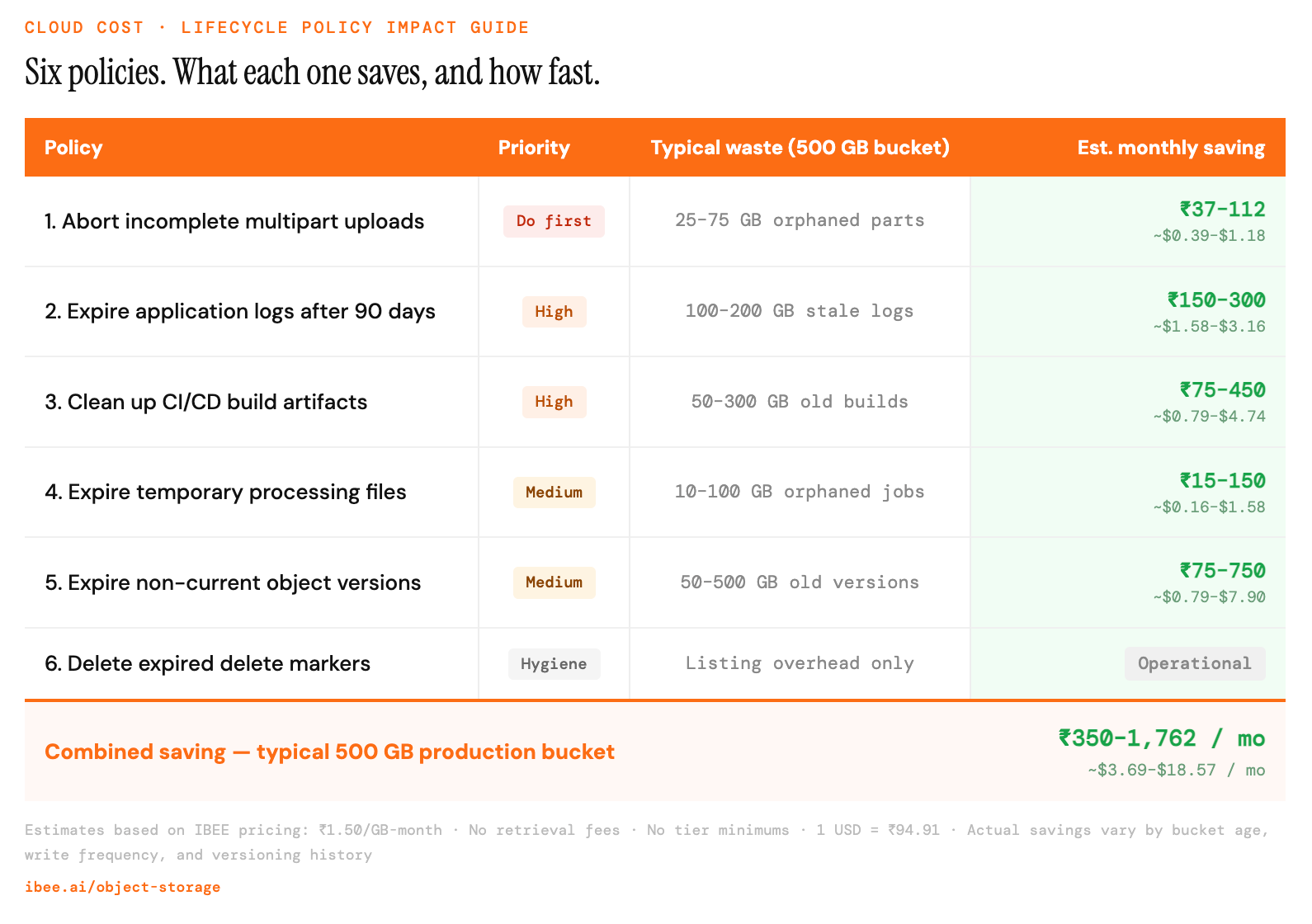
What each policy saves, and how quickly it pays off.
IBEE and Lifecycle Policies
IBEE's S3-compatible storage supports lifecycle policy configuration through the standard S3 API. All six policies described here apply using the same JSON format and AWS CLI commands, with the --endpoint-url flag pointing at IBEE's endpoint. No changes to the policy JSON are required when moving between AWS S3 and IBEE.
One difference worth noting: IBEE's flat pricing model has no retrieval surcharges and no storage class tiers. On AWS, lifecycle policies often involve a second layer of complexity around transitioning objects to Glacier or Intelligent-Tiering, which introduces retrieval fees and minimum storage duration commitments per tier. On IBEE, that complexity does not exist. The single storage class is already priced at Rs.1.50 per GB per month with no retrieval penalties and no minimum duration. Lifecycle policies on IBEE simplify to a single decision: keep what is needed, expire what is not.