You know the failure mode: the node “works” in staging, then someone adds a flag to kubelet, a CNI tweak goes live, and suddenly you have a fleet of workers that expose more than you intended. The migration took six weeks. Three of them were spent undoing a decision made in the first hour.
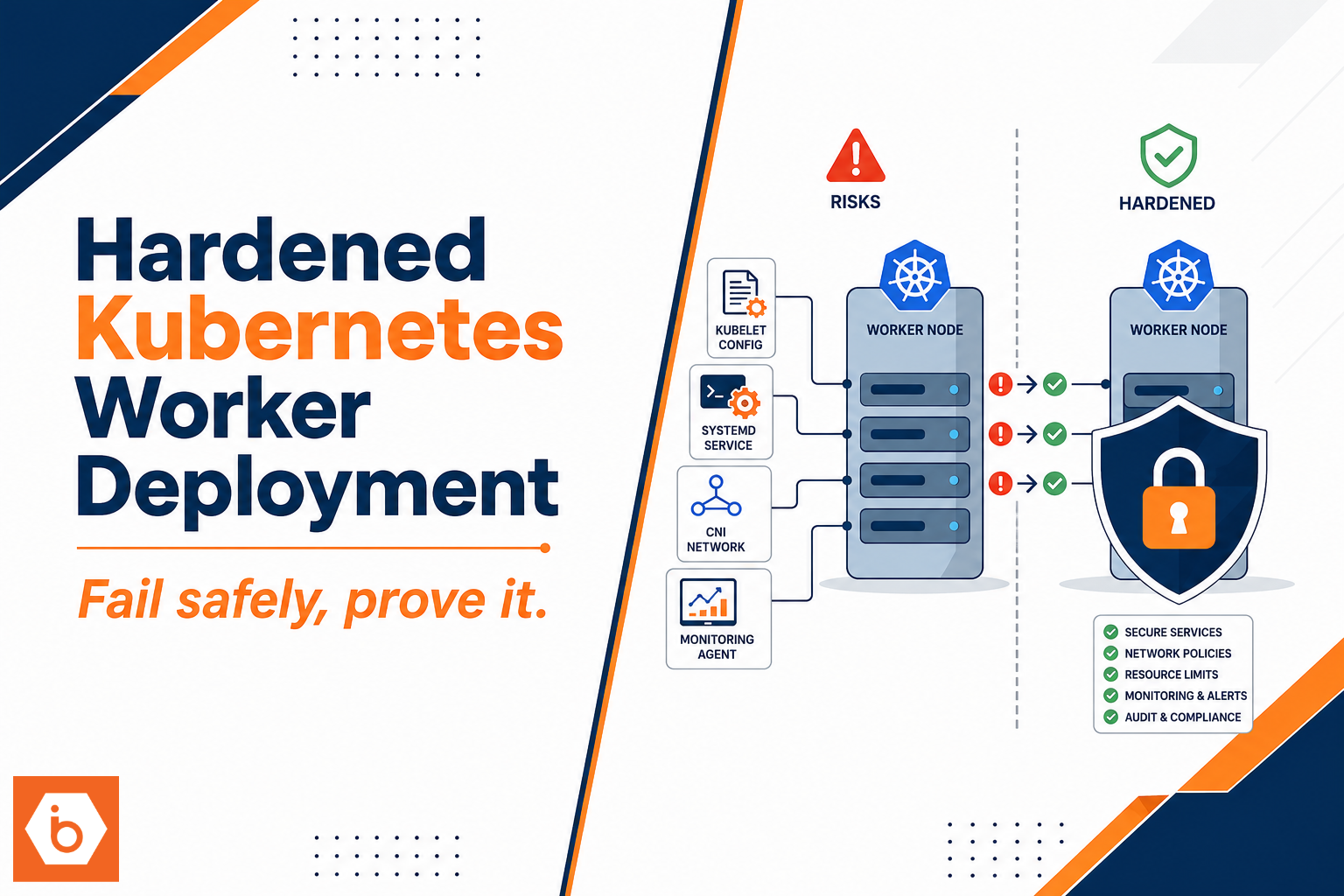
Most teams get this wrong by treating hardening as a checklist at the end. It is not. Hardening is wiring choices across kubelet config, systemd, CNI behavior, and monitoring so the node fails safely and you can prove it.
What a production worker must do (and what it must not)
A production Kubernetes worker is not just “kubelet plus containers.” It is a chain of trust and a chain of failure domains:
- kubelet registers the node, watches pod specs, and talks to the API server.
- container runtime (usually containerd) executes workloads through CRI.
- CNI creates pod networking and programs routes and firewall rules.
- systemd controls how kubelet and runtime run, with the privileges and filesystem access you allow.
- monitoring gives you evidence: node health, kubelet health, runtime health, and network behavior.
Your hardening goal is boring and specific: reduce attack surface and reduce “mystery failure.” That means you must lock down kubelet endpoints, ensure kubelet authentication and authorization are correct, prevent risky runtime behaviors, and configure eviction so the node stays operational under pressure.
The uncomfortable truth: you can “secure” RBAC on the control plane and still get pwned at the node. A compromised pod can only do what the node allows. If kubelet is exposed, if systemd units run too privileged, if CNI allows spoofing, or if you do not have alerts for kubelet and runtime errors, you are not running production. You are running a delayed incident.
Worker node architecture and the hardening boundaries
Before you touch configs, draw the boundaries. You need to know where trust starts and ends. kubelet trusts the API server, workloads trust kubelet for lifecycle, and networking trusts CNI to isolate pod traffic. Your job is to make those trust edges explicit and locked.
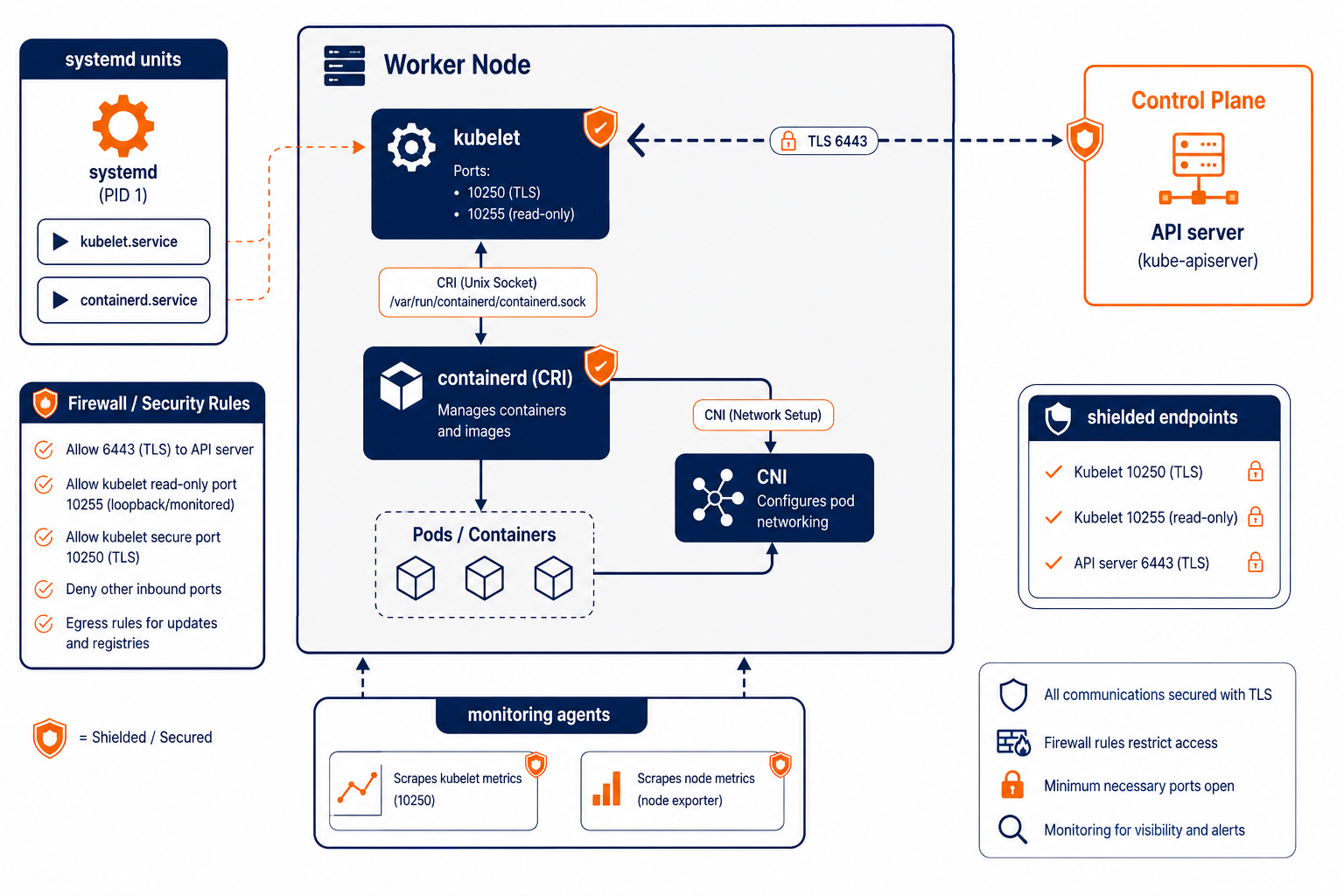
Shows where kubelet, containerd, CNI, systemd, and monitoring interact on a hardened worker node
Kubelet hardening: config file first, insecure endpoints last
Kubelet supports two ways to configure behavior: flags and a config file. In production you want the config file because it is auditable and consistent across nodes. Your team will still use flags sometimes, but the “source of truth” should be YAML.
Start with these kubelet hardening categories and map them to your Kubernetes version’s kubelet config schema:
Authentication and authorization: kubelet must authenticate to the API server with the expected mechanism (client certificates in many self-managed setups, or the managed bootstrap flow you use). For authorization, prefer the mode that delegates decisions to the API server rather than letting kubelet invent its own rules. Also make sure you do not accidentally enable an auth mode you do not monitor.
Disable insecure/read-only endpoints: kubelet historically exposed endpoints that you do not want on an untrusted network. Bind kubelet to trusted interfaces only, disable insecure ports, and block access at the host firewall. If you can hit kubelet metrics or health endpoints from anywhere except your monitoring network, you already lost.
TLS and certificate rotation: kubelet uses TLS to talk to the control plane. You want rotation enabled where your setup supports it, and you want your automation to handle rotation without manual node reboots. Long-lived credentials are how “temporary” access becomes permanent.
Eviction and stability behavior: configure eviction thresholds so the node stays healthy under resource pressure. Without eviction tuning, you get cascading failures when disk or memory gets tight. Hardened nodes also set image garbage collection thresholds so you do not fill the disk with old images and then discover it during an outage.
Logging and verbosity: set log level to something you can actually operate. Too chatty means you drown in logs and miss the real signal. Too quiet means you cannot explain failures. Ship kubelet logs and runtime logs to your central logging, with access controls.
Most teams get this wrong here: they disable read-only ports, but they leave kubelet bound broadly and rely on “security groups will save us.” That fails the moment someone misconfigures a firewall rule or adds a temporary bastion. Harden at the service level and at the network level. Assume the network will make mistakes.
A practical kubelet checklist you can adapt:
- kubelet uses a config file, not only flags
- insecure ports are disabled and endpoints bind to trusted interfaces only
- webhook or API-delegated authn/authz is enabled as your cluster supports it
- certificate rotation is enabled and your automation handles renewal
- eviction thresholds are set for memory and disk, not defaults
- image garbage collection thresholds are set to avoid disk fill
- log level is set intentionally, and logs are shipped securely
- health and metrics endpoints are protected by firewall rules and monitoring allowlists
- kubelet node data directories have restricted filesystem permissions
systemd hardening: stop giving kubelet a blank cheque
systemd is where you turn “works” into “stays constrained.” Most kubelet deployments rely on systemd unit files for kubelet and containerd. Those unit files decide what user runs the service, what directories it can write, and what kernel capabilities it can use.
There are a few principles you should apply across both kubelet and containerd units:
Run as least privilege: kubelet should run as a dedicated user with a dedicated group. containerd should also run with minimal privileges and only the permissions it needs to manage container state.
Constrain filesystem access: use systemd hardening directives like ProtectSystem, ReadOnlyPaths, and InaccessiblePaths to prevent the service from writing to random parts of the host. You do not need kubelet to write to /home or /tmp beyond what it uses.
Isolate temporary files: use PrivateTmp so the service cannot interfere with other processes’ temp files.
Block privilege escalation: set NoNewPrivileges=true and avoid broad capability grants. If you must add capabilities for a specific integration, do it narrowly and document why.
Restrict syscalls: use SystemCallFilter where feasible. This is the hardest part to do without breaking workloads, so start by validating in a staging environment that runs your real images and volume types.
Make restarts safe: set restart policies and timeouts so kubelet does not flap endlessly. Also ensure you have a clear signal when the service fails, because “crash loop” is a common symptom of misconfiguration that you will otherwise detect too late.
One more thing: treat the unit file as code. Store it in your infrastructure repo, render it via automation, and roll it out like you would any other production change. If someone edits /etc/systemd/system manually on a node, you lose traceability.
CNI hardening: network isolation is where attackers start moving
CNI is not optional plumbing. It is the enforcement layer for pod-to-pod and pod-to-node traffic. If CNI is misconfigured, you get IP spoofing, overly permissive routing, and broken network policies.
Your hardening work here depends on the CNI you use, but the categories stay constant:
IPAM and routing correctness: ensure pod IP allocation is deterministic within the cluster and that routes are programmed correctly. Misconfigured IPAM often leads to flaky connectivity that teams “fix” by loosening network rules.
Network policy enforcement: if you rely on Kubernetes NetworkPolicy, your CNI must enforce it. If you do not enforce NetworkPolicy, do not pretend you have tenant isolation. At that point you need either CNI enforcement or an alternative network segmentation strategy.
Anti-spoofing and egress controls: hardened setups ensure that pods cannot spoof source IPs and that egress is controlled according to your security model.
MTU and fragmentation behavior: mismatched MTU causes intermittent failures. Teams sometimes “fix” it by disabling security features or opening more ports. Fix MTU and keep the security posture.
CNI health and observability: you need metrics and logs from CNI components. If CNI fails to program iptables or nftables rules, kubelets will still report nodes as Ready while traffic fails. That is how you end up paging on the wrong symptom.
Monitoring that catches node hardening regressions
Monitoring is not just dashboards. It is your guardrail against configuration drift and security regression.
You need coverage at four layers:
Node health: CPU, memory, disk, disk inode usage, network errors, and filesystem saturation. Disk pressure incidents are common and they look like application failures until you check node metrics.
kubelet health: kubelet metrics and logs, including container lifecycle errors, volume mount failures, and eviction events. You want alerts that fire when kubelet stops reporting healthy status, not when users complain.
container runtime health: containerd metrics, CRI errors, image pull errors, and sandbox creation failures. If the runtime is failing, kubelet often keeps trying and you get cascading retries.
CNI health: metrics or logs from CNI components, plus alerts for pod networking failures. If your CNI silently fails to apply rules, you need to know immediately.
If you only monitor “node Ready,” you will miss the hardening failures. Ready can stay green while networking or kubelet endpoints are broken. Treat “Ready” as a coarse signal, not a security signal.
One practical approach is to ensure you scrape kubelet and node metrics over a protected path, and that you alert on changes in kubelet endpoint behavior, not just on raw CPU spikes. For example, alert when kubelet metrics endpoint becomes unreachable from your monitoring network, or when kubelet logs show repeated auth failures to the API server.
Next step you can take today
Pick one worker node and do a controlled hardening pass. Do not change everything at once.
- Export your current kubelet config and systemd unit files into your repo so you have a baseline.
- Disable any kubelet insecure ports and restrict kubelet binds to trusted interfaces, then verify from an untrusted host that the endpoints do not respond.
- Apply kubelet eviction and image GC thresholds appropriate for your node disk size and workload image churn.
- Update systemd hardening directives for kubelet and containerd in staging, run your real workloads, then roll to production.
- Confirm CNI network policy enforcement and anti-spoofing behavior in a test namespace with negative tests (traffic that must be blocked should stay blocked).
- Add monitoring alerts for kubelet health, runtime errors, and CNI failures so a regression triggers before it becomes an outage.
If you want to wire this into your platform workflow, treat node hardening as a reusable “node profile” in your Kubernetes platform engineering setup, and roll it out with the same discipline you use for application changes. IBEE can support the infrastructure side of that rollout with Cloud VMs and Bare Metal Servers when you need consistent node baselines across environments.