
The “backup plan” that failed in hour one
The migration took six weeks. Three of them were spent undoing a decision made in the first hour. That is how backup failures show up too: you think you have a plan, then ransomware hits or a disk dies, and your “backup” is either corrupt, reachable from the wrong network, or restores to the wrong version.
Most teams treat backups like a checkbox: configure a job, point it somewhere, and move on. Then the incident arrives and you learn the hard parts were never tested. Integrity was never verified. Restores were never rehearsed. “Offsite” meant “same credentials, same network, different folder.”
You need a strategy that assumes reality. Reality is messy. Failures stack. Attackers don’t just encrypt production. They go hunting for the weakest copy.
That is why the 3-2-1 backup and recovery strategy exists as your last line of defense. It is not a feel-good rule. It is a design constraint: keep multiple independent copies, spread them across failure modes, and make sure at least one copy stays out of reach when things go bad.
The 3-2-1 rule, without the comforting myths
Here is the rule in plain terms for a critical dataset (database, state store, file store, anything your product cannot recreate from scratch):
You keep three copies of the data.
You use two different backup media types.
You keep one copy offsite or inside a separate isolation boundary.
“Independent” matters more than “separate destinations.” Most teams get this wrong by treating “two backups” as two copies. They actually create one backup pipeline with two destinations, but both destinations share the same credentials and the same network path. If an attacker steals one access token or pivots through the same network, both destinations get hit. That is not 3-2-1. That is one event with two write targets.
Independence has a few practical dimensions you should test:
Storage independence. Disk snapshots and object storage behave differently under failure. A storage-layer bug or misconfiguration should not wipe both.
Credential independence. Your backup and restore identities should not be the same identities your production workload uses.
Network reachability independence. Your offsite copy must not be reachable from the compromised environment in any realistic incident.
Operational independence. Restore tooling should not depend on the same brittle assumptions that failed during the incident.
The third copy is your insurance against correlated failure. Correlated failure is the enemy. Correlated failure is how you end up with “backup exists” but “restore fails.”
How to implement it in a way you can actually operate
You can pick many combinations, but the common one is:
Primary: your production system.
Backup set A: fast restores using disk-based snapshots.
Backup set B: durable retention using object storage.
Offsite copy: the object storage set in an isolated boundary with retention controls.
This gives you two benefits at once. Snapshots let you recover quickly when you need a short RTO. Object storage gives you durability and retention when you need to survive corruption, operator mistakes, and attacker activity. In production environments, teams often separate backup retention from compute entirely by pushing long-retention copies into S3-compatible object storage with isolated access controls and immutable retention policies. Platforms like IBEE Object Storage are useful here because the storage layer stays API-compatible with existing S3 tooling while letting teams keep backup traffic and retention costs predictable.
And yes, object storage is a natural place for the offsite copy because you can isolate access policies and retention controls separately from compute. If your offsite design still depends on production network access, you did not solve the problem.
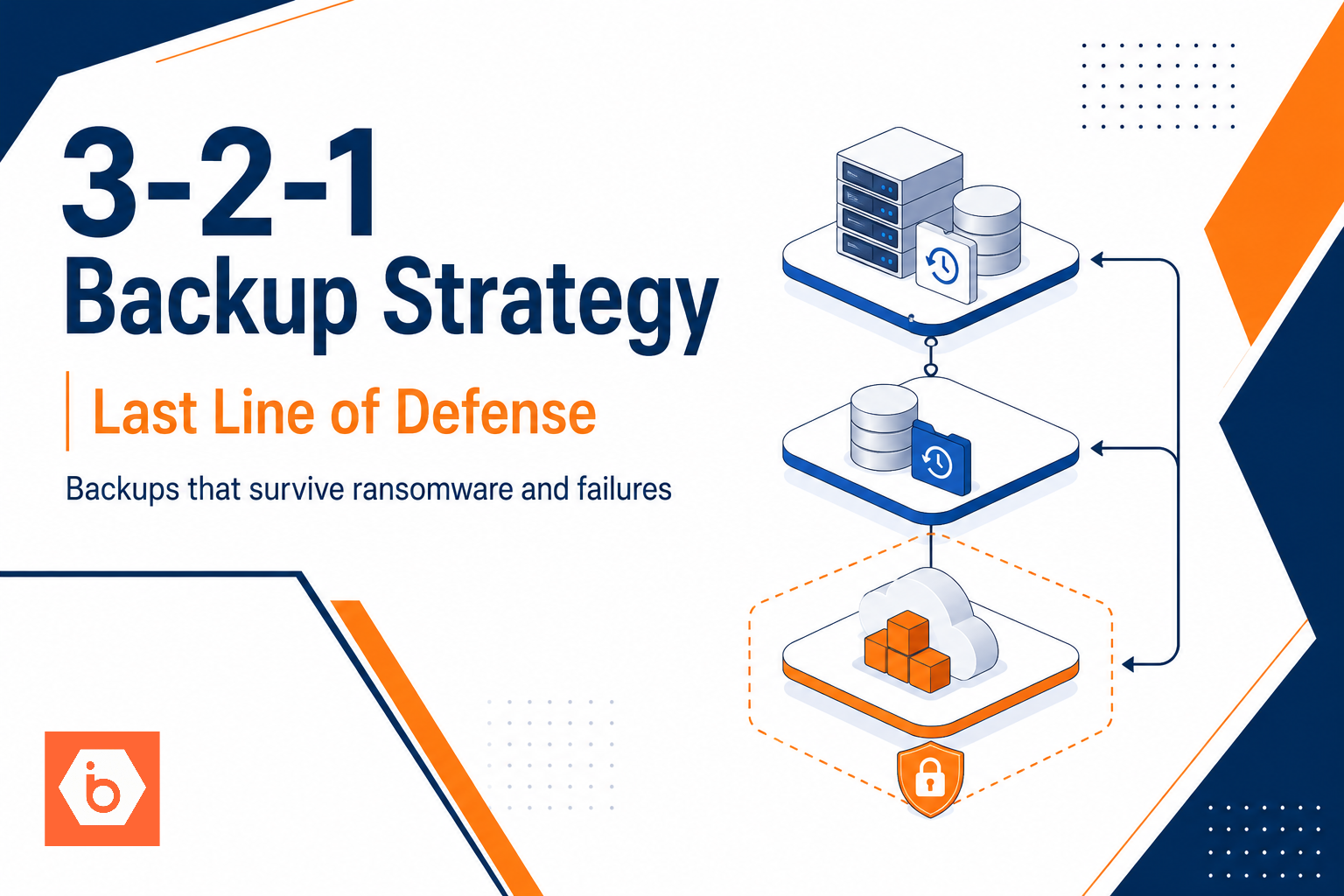
Visual: what “3-2-1” should look like in your architecture
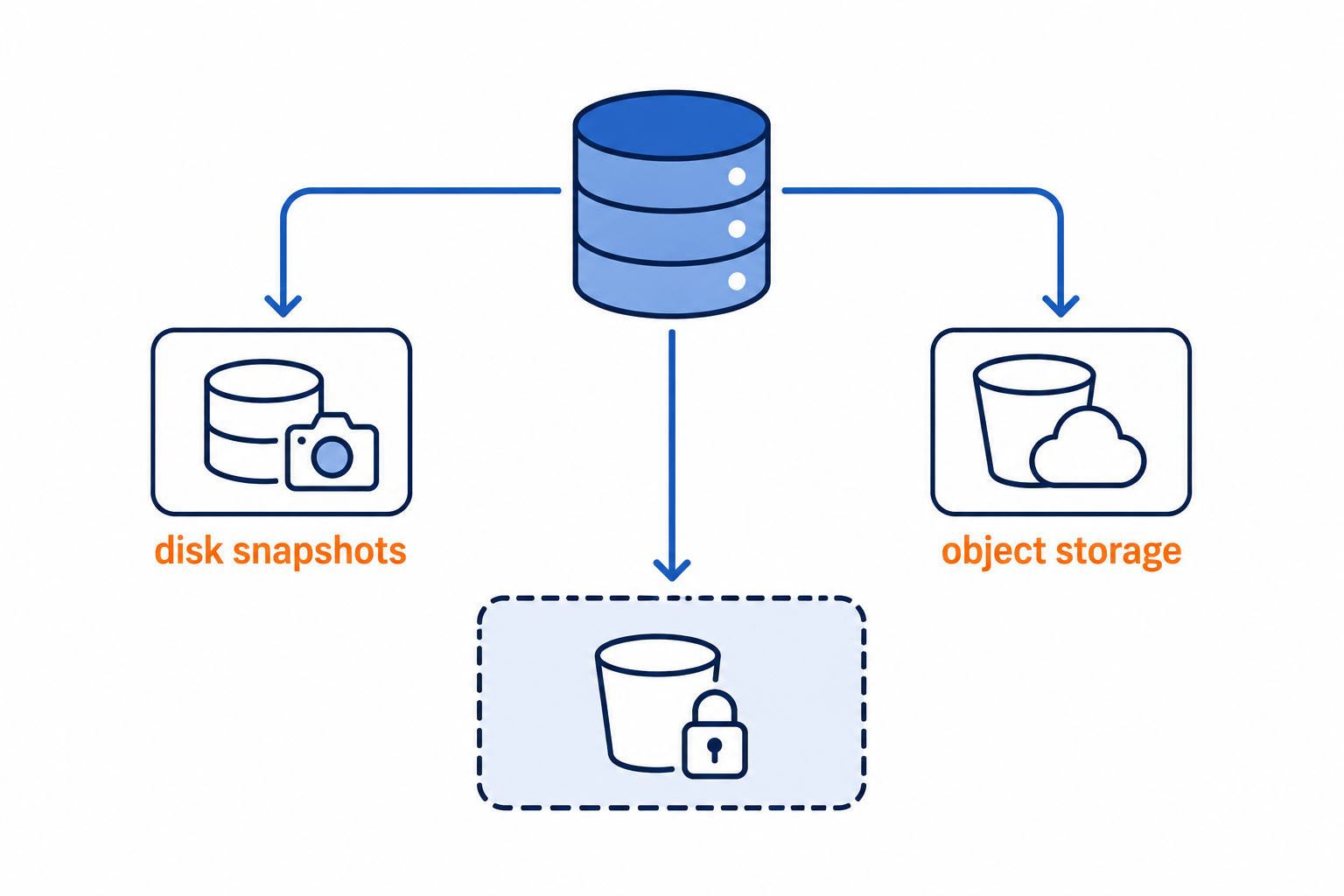
Shows the primary dataset feeding three independent backup targets with different media types and an offsite isolation boundary.
Ransomware and disk failure: recovery is an operational mode switch
When ransomware hits, your job is not to “restore backups.” Your job is to get the business running from a known-good state fast, without trusting anything that might already be poisoned.
If you start restoring while the compromised environment still has network access and active credentials, you will overwrite your own recovery path. That is how teams “restore” and still lose.
Think in phases.
First: containment. Cut network access for affected hosts. Freeze credential use. Stop automated jobs that might overwrite data. Then you switch to recovery modes that assume the worst.
Second: identify the blast radius. Determine which systems show encrypted content, which backup repositories changed, and which credentials got reused. This step matters because it tells you what you can trust.
Third: restore from the copy you designed to survive. That usually means the offsite or immutable copy, not the local snapshot that shares the same trust boundary. Pick the last point where integrity checks pass. If you cannot prove integrity, you do not “continue with the restore.” You stop and investigate.
Fourth: rebuild services, then reattach data. Restore databases and file stores first. Bring app servers up with fresh instances and least-privilege access. Do not reuse the same compromised runtime identity if you can avoid it.
Fifth: validate before you resume writes. Run application-level checks and consistency tests. If you cannot prove the restored dataset is clean, keep the system read-only and investigate.
Here is the part most teams underinvest in: practice. RTO comes from practice, not from reading docs. Teams that test restores monthly cut mean recovery time by about 30% compared to teams that test ad hoc. That is not magic. It is muscle memory and fewer “where is the runbook” delays.
If you want a practical way to make this repeatable, standardize your snapshot schedules and retention so your restore points are consistent. When your restore points are consistent, your runbooks become reliable. When your runbooks are reliable, you stop improvising during incidents.
Recovery testing: prove backups are usable, not just present
Backups that “exist” but cannot be restored are just expensive storage. Recovery testing proves you can actually get data back under pressure, with the right point in time, and with working procedures.
Most teams get this wrong by validating only that backup jobs run. Then the first real test happens during an incident. That is how you burn days.
You should test like an attacker and like a tired on-call engineer.
Restore to a clean environment, not the same host you backed up from. This catches hidden dependencies and stale configs.
Validate point-in-time correctness by confirming the restored state matches what the app expects for that timestamp.
Measure restore time against your RTO by running drills that include DNS, credentials, and service bring-up.
Confirm integrity by running application-level checks, not just “files are there.”
Do one baseline drill per quarter and one targeted drill per change window for critical systems. Track failure reasons. If you log “restore succeeded” but the app cannot start, your test is lying to you.
One more nuance: don’t just validate the restored state. Validate the restore path itself. If your offsite copy depends on a brittle access policy or a restore workflow that only works from a specific bastion host, your “offsite defense” is a story you tell yourself.
Also, test the nasty failure modes you actually care about:
Restore while the original production environment still exists but stays isolated. This catches accidental overwrite and credential misuse.
Restore into an environment that cannot reach production. This catches “it worked because production was there” dependencies.
Restore with the same operational constraints you have during incidents. If your restore requires someone to manually approve access, simulate that. If your restore requires a ticket, simulate that. Your incident does not wait for your convenience.
Common backup failures you should assume will happen
Most teams treat backups like insurance. Then they discover the policy is fake during a real incident.
Corrupted backups usually come from weak integrity checks, bad pipeline assumptions, or silent failures in the middle of a job. Slow restores usually come from “we’ll optimize later” decisions: oversized datasets, no restore rehearsals, and restore paths that depend on the same credentials and network paths the attacker already hit.
And here is the nasty reality: a backup can complete without errors and still be unusable.
You should expect these failure patterns:
You snapshot or copy while the system writes, so you restore a mix of old and new blocks. It passes storage-level checks but fails at runtime.
You lose metadata with the data, like permissions, ownership, indexes, or encryption keys. The restore “works” but the app cannot start.
Your immutability relies on the backup job identity, not on storage-side controls. Ransomware deletes or overwrites the very sets you need.
You discover restore is slow only after you measure it, and you miss your RTO by 2 to 5x.
The fix is usually not “buy a different backup vendor.” It is workflow and independence.
Your goal is to make the attacker’s job and the failure blast radius as large as possible, while your restore process stays predictable.
Your next step today: pick one Tier-0 system and run a restore drill
Don’t start by rewriting your whole backup strategy. Start by proving one critical path.
Pick one Tier-0 system (the one you cannot recreate quickly). Schedule a restore drill that produces a measurable RTO outcome. Restore into an isolated environment that cannot reach production. Validate integrity and app-level correctness before you declare it successful.
Then write down three things after the drill:
What step took the longest and why.
Where you had to improvise.
Which copy you restored from and whether it was truly isolated.
If you can’t do that within a day, your plan is not ready. Run the drill anyway, then fix the top failure point immediately.