
The Ad-Hoc ML Storage Problem
Most Indian ML teams start storing datasets on a researcher's laptop. The laptop becomes a shared server. The shared server becomes an NFS mount. The NFS mount grows a datasetsv2, datasetsv2final, and datasetsv2finalACTUALLY_FINAL directory structure. Nobody can reproduce experiments from six months ago because nobody is certain which version of the dataset was used.
This is not a discipline problem. It is an infrastructure problem. Without a storage system that natively supports versioning, access control, and remote access, ML teams default to workarounds that create the reproducibility and collaboration problems that slow down both research and production deployment.
We have seen this directory archaeology problem in ML teams of every size: from two-person research groups at Indian AI startups to data science teams at large enterprises running their own NLP models. The version naming gets creative. The outcome is always the same.
Object storage with a deliberate organisation scheme solves all three problems at once.
The Bucket Structure
Organise ML storage into separate buckets by function rather than keeping everything in one flat bucket or one flat directory tree. Four buckets cover the majority of ML team storage needs.
The raw data bucket, named something like company-ml-raw, holds data exactly as collected: scraped web content, API exports, sensor readings, user-generated content, and third-party dataset downloads. This bucket is write-once. Nothing in it is ever modified or deleted. If a data collection run produces bad data, the bad data stays and is noted in metadata. The raw record is the ground truth of what was collected, and its integrity is the foundation of everything downstream.
The datasets bucket, company-ml-datasets, holds processed and versioned data ready for training. Data here has been cleaned, labelled or linked to annotation metadata, and prepared in training-ready format. Every dataset is versioned with a semantic version key prefix: datasets/image-classification/v1.2.0/ contains the complete training, validation, and test splits for that version. Old versions are never deleted. They are the historical record that makes experiment reproducibility possible.
The artifacts bucket, company-ml-artifacts, holds model checkpoints, final model weights, experiment outputs, and evaluation metrics. Each experiment gets a directory keyed to the run ID from the experiment tracker, whether that is MLflow, Weights and Biases, or a homegrown system. The run ID is the link between the code, the dataset version, and the model artifact.
The annotations bucket, company-ml-annotations, holds raw annotation files, labelling tool exports, and annotation job metadata. It is kept separate because annotation data has a different access pattern and a different lifecycle from training data: it is written by annotation tooling, read by dataset preparation pipelines, and rarely accessed again after a dataset version is finalised.
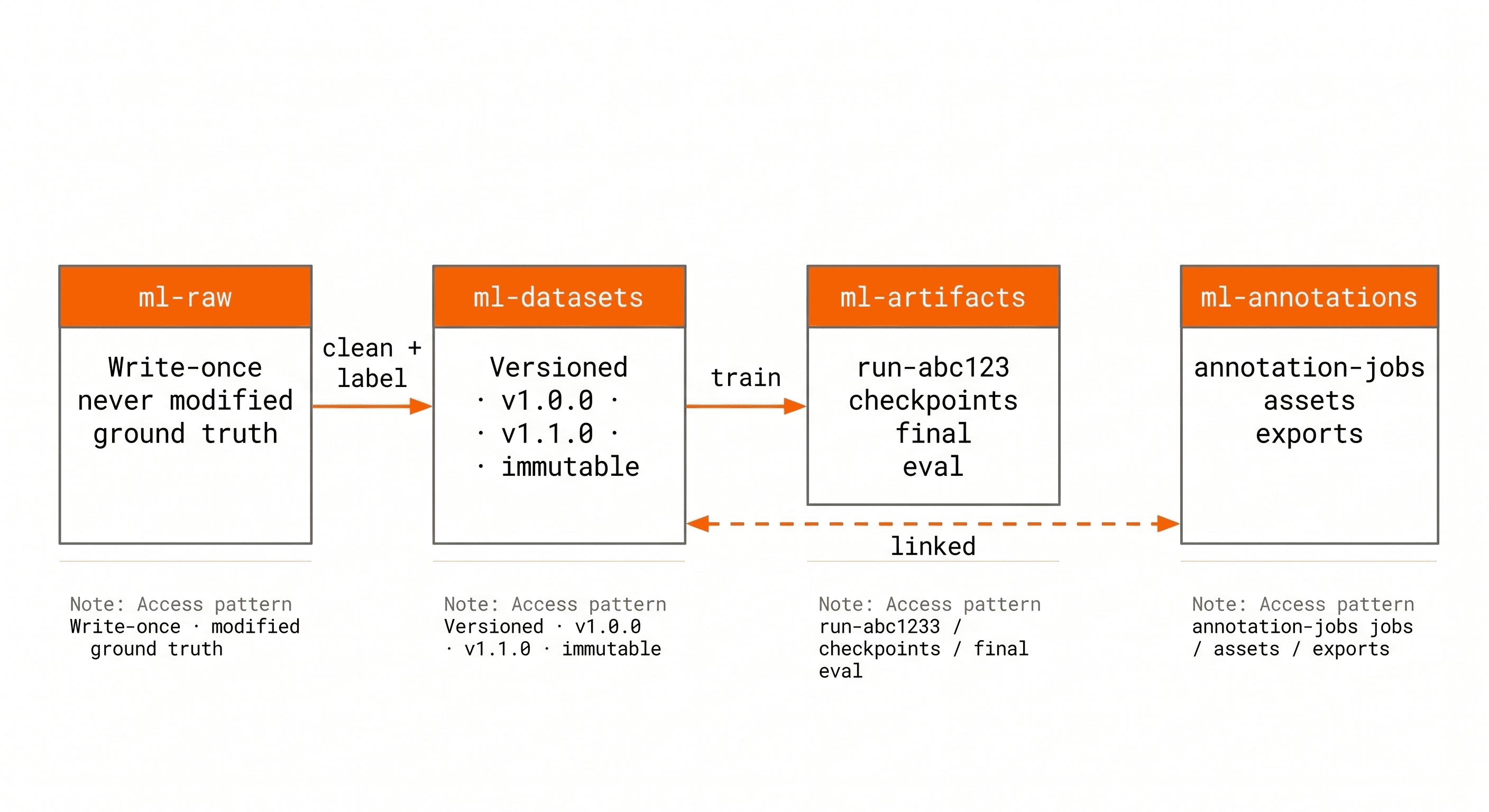
One bucket per function, not one bucket for everything.
Dataset Versioning
Dataset versioning is the practice of treating each meaningful version of a training dataset as an immutable, addressable artifact, exactly like software versions. Version 1.0.0 of a dataset is a specific set of files with a specific label distribution. Version 1.1.0 adds new data from a second collection run. Version 2.0.0 changes the label taxonomy. Each version is a permanent record, not a state.
Key prefix versioning is the simplest approach: store each version under a prefix that includes the version number, such as datasets/ner-hindi/v1.0.0/train/, datasets/ner-hindi/v1.0.0/val/, and datasets/ner-hindi/v1.0.0/test/. When a new version is created, write to a new prefix. The old version remains unchanged and accessible at its original path forever.
Dataset manifest files record the contents of each version: a JSON file at datasets/ner-hindi/v1.0.0/manifest.json listing every file in the dataset, its size, its SHA256 checksum, and relevant metadata such as annotation tool version, labeller IDs, and collection date range. The manifest is the authoritative record of what a dataset version contains.
The teams that handle reproducibility consistently well tend to share one habit: they treat the manifest file as the primary artifact, not the data itself. When an experiment cannot be reproduced months later, the first thing to check is whether the manifest exists, whether the checksum matches, and whether the dataset version recorded in the experiment tracker points to a version that still exists in storage. Those three checks resolve the large majority of reproducibility failures.
IBEE's object versioning, enabled at the bucket level, provides an additional safety layer. If a key is accidentally overwritten, the previous version of the object is preserved and recoverable. This is not a replacement for semantic version prefixes but a backstop against accidental writes to an existing key.
Efficient Training Data Loading
Loading training data efficiently from object storage is a function of how data is stored and how the training loop reads it.
For structured data, use Parquet files rather than CSV. Parquet stores data in column-major order, which means reading a subset of columns for training does not require reading the full row. For tabular ML datasets with many features, Parquet reading is substantially faster than CSV for typical training access patterns and produces smaller files that cost less to store.
For large image and audio datasets, use sharded archives rather than individual files. Loading one million individual JPEG files from object storage involves one million GET requests, each with network round-trip overhead. Sharding the dataset into WebDataset-format tar archives reduces one million GET requests to a few hundred, dramatically improving data loading throughput without changing the training code logic.
WebDataset is an open format for streaming large datasets from S3-compatible storage. Each shard is a tar archive containing matched sample files, for example 000001.jpg and 000001.json for image-label pairs. PyTorch's DataLoader reads WebDataset shards from S3-compatible URLs, with parallelism controlled by the num_workers setting. IBEE works with WebDataset by setting the AWS_ENDPOINT_URL environment variable to IBEE's endpoint before initialising the dataset loader. No other configuration changes are required.
For training runs longer than a few hours, prefetch and cache the first epoch's data to a local NVMe disk and serve subsequent epochs from cache. This eliminates repeated object storage GET requests for the same files and removes storage egress cost from the per-epoch compute budget entirely.
Annotation Workflow Storage
Annotation pipelines generate data at multiple stages: raw assets sent for annotation, completed annotation exports, quality review outputs, and final merged labels. Each stage needs to be preserved separately.
Raw annotation assets, whether images, audio clips, or text documents, are stored in the annotations bucket under a job ID prefix: annotation-jobs/ner-job-2024-03/assets/. These are the files that annotation tooling and annotators access directly during the labelling run.
Annotation exports from labelling tools such as Label Studio, CVAT, or Labelbox are stored alongside the assets: annotation-jobs/ner-job-2024-03/exports/2024-03-15-export.json. Multiple exports per job are preserved. If disagreements are re-annotated, both the original and revised exports are kept. Deleting an export to save storage space is a reproducibility risk that is not worth the few rupees saved per GB.
Merged labels, the final reconciled annotation file used to produce a training dataset version, are stored in the datasets bucket under the corresponding version prefix. This creates a traceable link in both directions: from a training dataset version, the annotation job and the exact export file that produced the labels can be identified; from the annotation job, the dataset versions that used it can be listed.
Model Artifact Storage
Every training run produces artifacts: checkpoints saved during training, final model weights, evaluation metrics, and generated outputs such as confusion matrices, loss curves, and sample predictions.
Store artifacts under a directory keyed to the experiment tracker run ID: company-ml-artifacts/runs/run-abc123/. Within that directory, checkpoints go under checkpoints/, the final model under final/, and evaluation outputs under eval/. The run ID is the link to the MLflow or Weights and Biases record that stores the dataset version, hyperparameters, and code commit hash used for that run. With that link intact, any artifact can be traced back to the exact code and data that produced it.
Final model weights promoted to production should be copied to a separate path, company-ml-artifacts/production/model-name/v1.0/, with a manifest recording the run ID, dataset version, evaluation metrics, and the name of the engineer who approved the promotion. This makes the production model lineage auditable and the rollback path unambiguous: to roll back, point inference to the previous production prefix.
Access Control for ML Data
ML data has different sensitivity profiles across its lifecycle. Raw data collected from users may contain PII. Production model weights should be readable by the inference serving layer but not by every researcher on the team. Annotation assets should be reachable by annotation tooling but not by the broader engineering organisation.
IBEE's S3-compatible IAM-style access controls allow per-bucket and per-prefix policies. A production deployment role gets read access to the company-ml-artifacts/production/ prefix only. Annotation tooling gets read and write access to the annotations bucket. Researchers get read access to processed datasets and write access to their own experiment output prefix within the artifacts bucket. The policies are written once in Terraform or a setup script and applied consistently at provisioning time.
IBEE for ML Teams
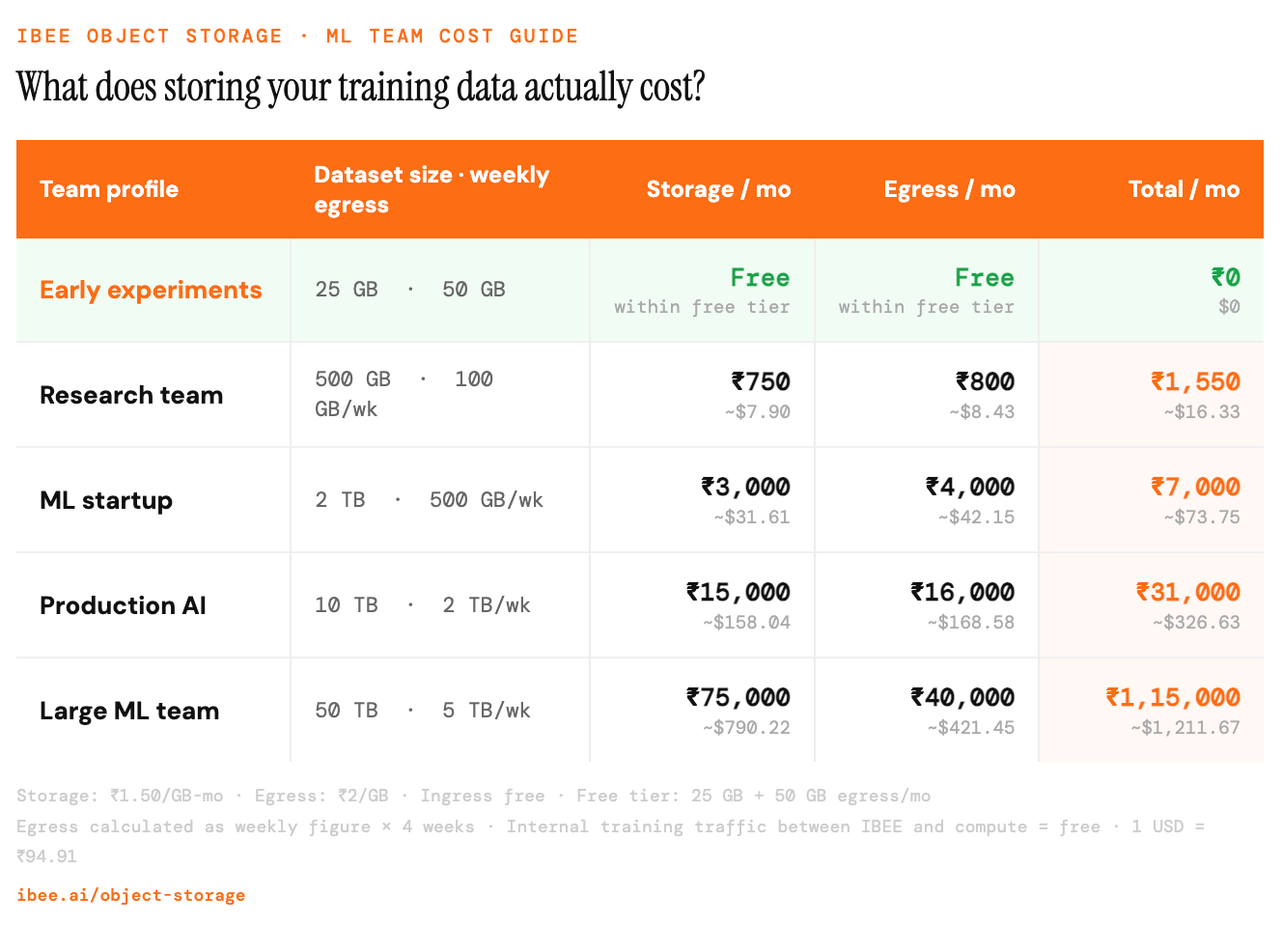
Storage and egress costs for ML teams at four scale points, using IBEE pricing.