
Why Object Storage for Static Sites
A static website, whether it is simple HTML, a Hugo or Docusaurus docs site, or a React SPA, is just a collection of files. HTML, CSS, JavaScript, images. There is no backend logic or runtime involved.
Using a web server like Nginx or Apache to serve these files adds extra work without real benefit. You have to manage, update, and scale it, even though all it does is deliver files. Object storage can do the same job directly, serving files over HTTP with less complexity.
This is how many large documentation sites and marketing pages handle high traffic, serving millions of requests without running a traditional web server.
A common concern is HTTPS and custom domains. That is handled by a CDN. The storage layer serves the files, while the CDN manages security, domains, and caching.
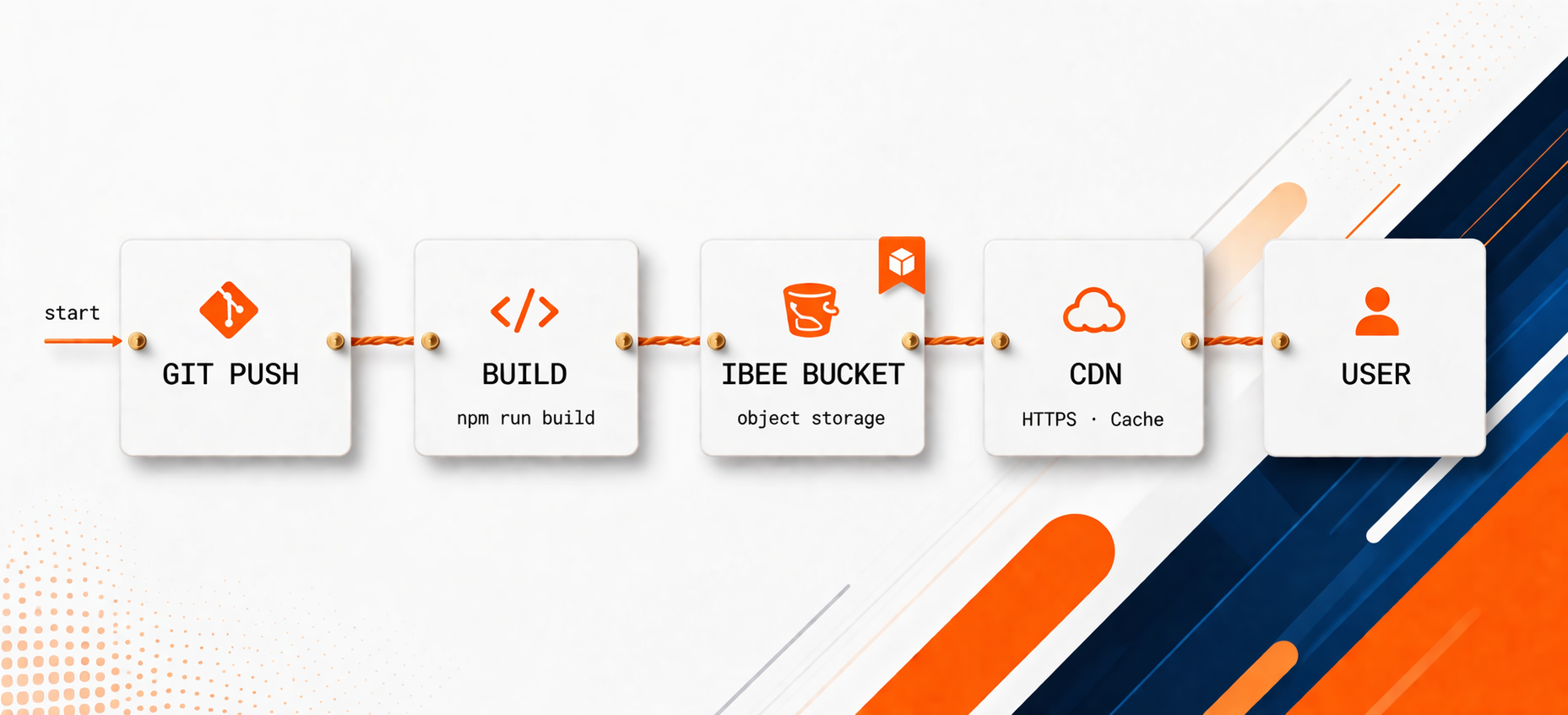
Git push triggers build. Build output syncs to IBEE bucket. CDN caches at edge. Users never hit the origin directly.
Step 1: Bucket Configuration
Create a bucket for your site. Enable public read access with a bucket policy that allows anonymous GET requests on all objects:
[CODE BLOCK: S3 bucket policy JSON allowing public GetObject on all objects]
Apply this policy using the AWS CLI pointed at IBEE's endpoint:
[CODE BLOCK: aws s3api put-bucket-policy command with --endpoint-url set to IBEE endpoint]
Step 2: Upload Your Build Output
After running your build tool (npm run build, gatsby build, hugo, and so on), upload the build output directory to the bucket:
[CODE BLOCK: aws s3 sync ./dist s3://your-bucket --endpoint-url IBEE_ENDPOINT --delete --cache-control "public, max-age=31536000"]
The --delete flag removes files from the bucket that no longer exist in the build output, useful for cleaning up old hashed asset files. You will want to adjust cache headers per file type — the next step covers this properly.
Step 3: Cache-Control Headers
Cache-Control headers are the most important performance configuration for a static site served from object storage. The right headers mean browsers and CDN nodes cache assets aggressively, reducing the number of requests that reach the origin bucket.
Hashed assets — JavaScript and CSS files generated by modern bundlers include a content hash in their filenames (main.abc123.js). Because the filename changes when the content changes, these files can be cached indefinitely. Set Cache-Control: public, max-age=31536000, immutable.
HTML files — HTML files contain the references to hashed assets and must not be cached aggressively, otherwise users receive stale HTML pointing to old asset filenames. Set Cache-Control: no-cache.
Images, fonts, and other static assets — these change infrequently but are not content-hashed in all configurations. One week is a reasonable default: Cache-Control: public, max-age=604800.
To set different headers per file type, use separate sync commands filtered by extension. Most teams get this wrong the first time by applying the same long max-age to everything including HTML, then spending twenty minutes wondering why their deployment is not showing up. Separate the HTML sync from the asset sync.
[CODE BLOCK: Three separate aws s3 sync commands — one for JS/CSS with immutable, one for HTML with no-cache, one for images/fonts with one-week max-age]
Step 4: CDN Configuration
Serving directly from the object storage origin URL works but is not optimal for two reasons: HTTPS requires a CDN to terminate TLS with your custom domain certificate, and CDN edge caching reduces the number of requests hitting the origin bucket, reducing both latency and cost.
Any CDN that supports a custom S3-compatible origin works with IBEE. Configure the CDN origin to point at IBEE's bucket endpoint URL. Enable HTTPS termination at the CDN edge with your custom domain certificate — most CDNs provide Let's Encrypt certificates automatically.
For SPAs with client-side routing, configure the CDN to return index.html for any path that does not match a known file. This is the SPA fallback configuration that allows React Router, Vue Router, and similar client-side routers to handle URLs that the storage layer has no corresponding objects for.
Step 5: CI/CD Deployment Pipeline
A deployment pipeline that runs on every push to main makes static site deployment a one-commit workflow.
[CODE BLOCK: Full GitHub Actions workflow — checkout, node setup, npm install, npm run build, aws s3 sync with IBEE endpoint URL set via AWS_ENDPOINT_URL env var]
The AWS_ENDPOINT_URL environment variable is respected by the AWS CLI and most AWS SDKs — it redirects all S3 calls to IBEE's endpoint without any other code change.
Handling SPAs: The Index Fallback Problem
Single-page applications serve all routes from a single index.html. When a user navigates directly to https://yourapp.in/dashboard, the object storage bucket looks for an object at key dashboard or dashboard/index.html. If it does not find one, it returns a 404.
The solution depends on your CDN. Most CDNs support a custom error page configuration: map 404 responses from the origin to a rewrite to index.html with a 200 status. In Cloudflare this is a Transform Rule. In most CDNs the configuration is equivalent: if the origin returns 404, serve /index.html.
With this in place, the CDN handles the index fallback and the SPA's client-side router takes over from there. Without it, direct URL navigation and browser refreshes will return 404 errors for any route except the root.
What It Costs
For a documentation site or marketing page with 100,000 monthly visitors loading an average of 1 MB of assets: 100 GB of monthly egress at Rs.2/GB is Rs.200 per month. Storage for the build output is under Rs.1 per month.
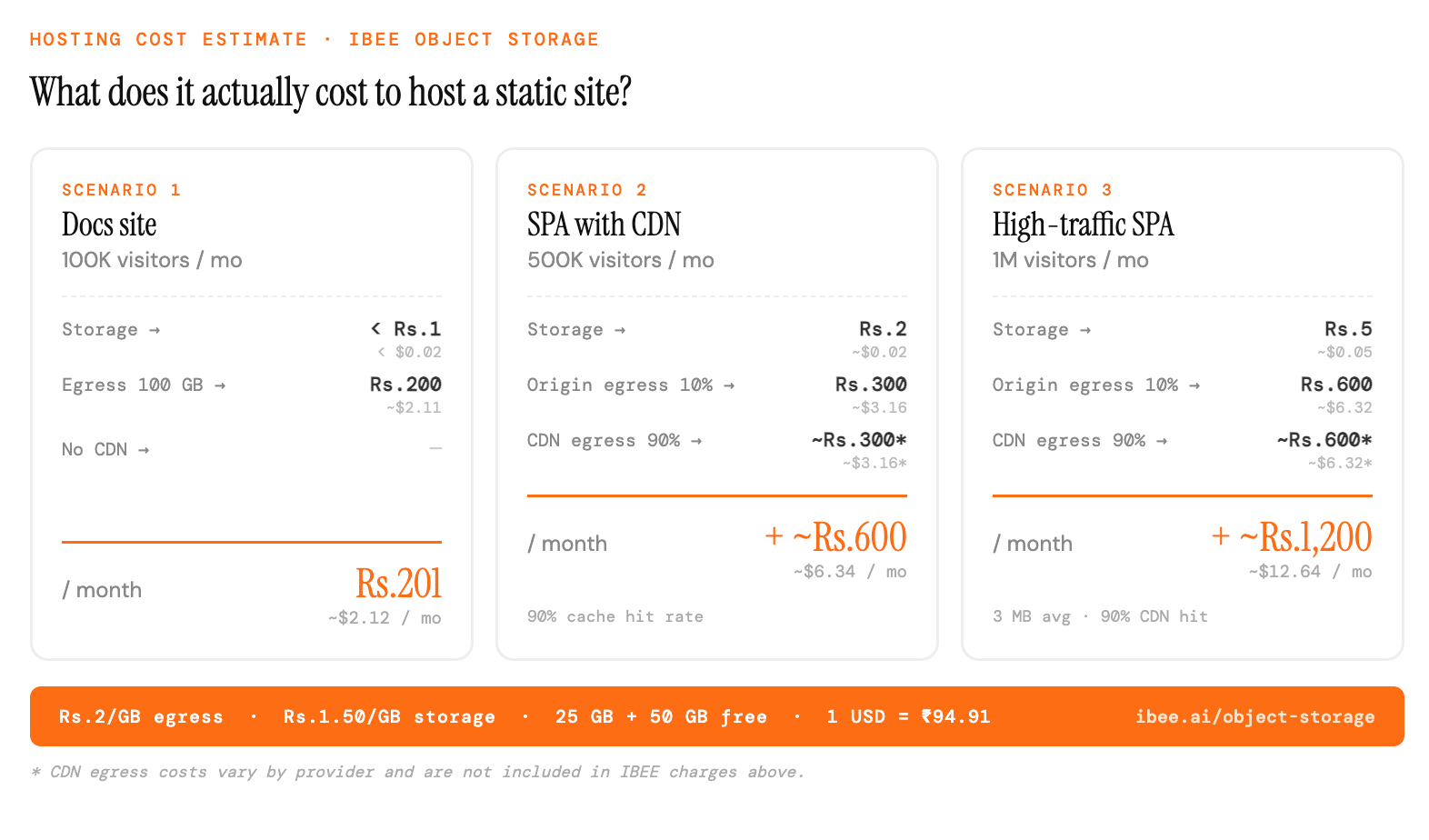
With a CDN in front, most static sites cost under Rs.1,000/month on IBEE.
For a high-traffic SPA with 1 million monthly visitors and 3 MB average page weight: 3 TB of monthly egress at Rs.2/GB is Rs.6,000 per month. With a CDN caching 90% of requests at the edge, origin egress drops to Rs.600 per month.