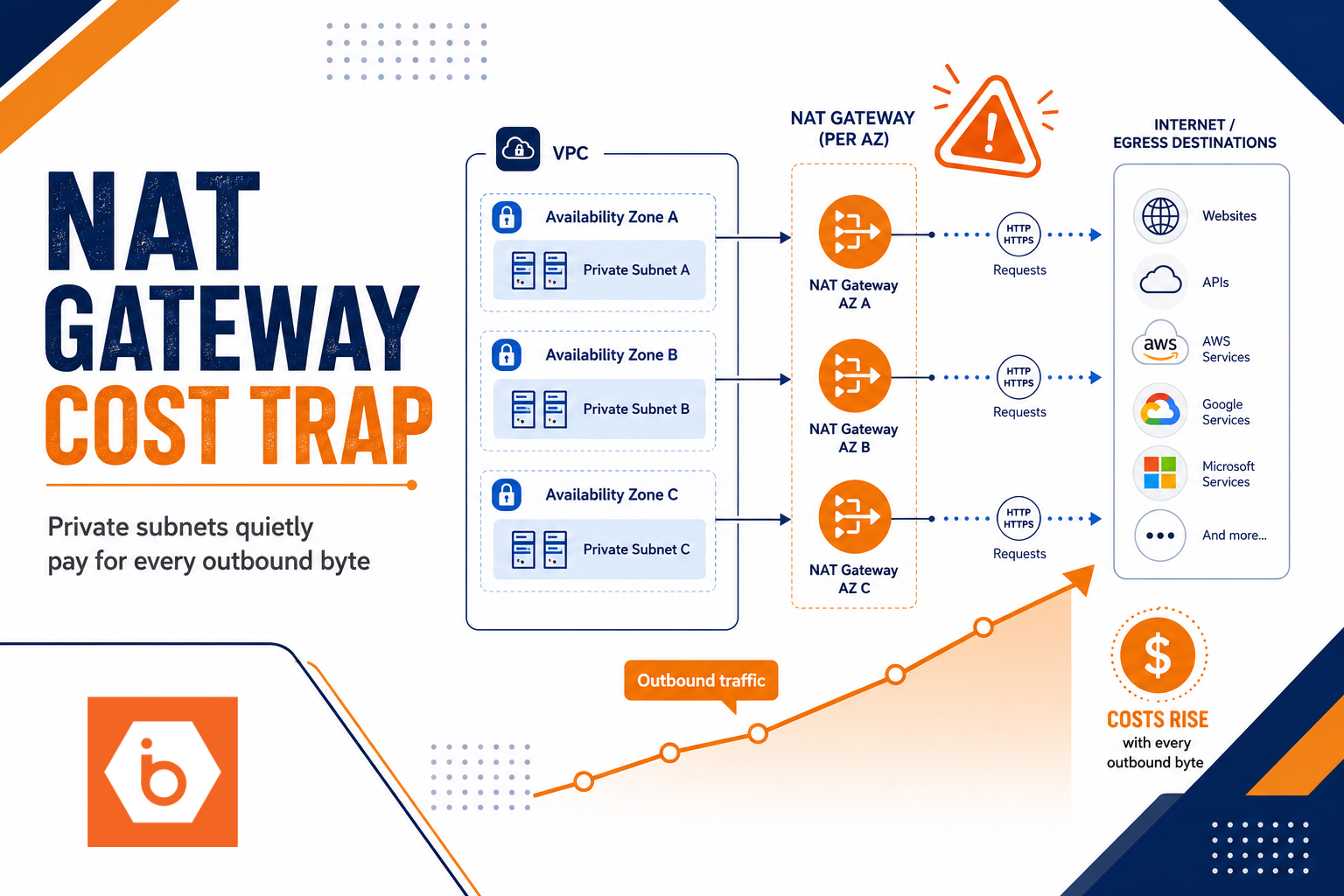

Most teams don’t “choose NAT Gateway.” They inherit it. Someone sets up private subnets for safety, adds a NAT Gateway per Availability Zone, and calls it done.
Then the bill arrives. Not with a dramatic spike. With a slow, steady climb that makes you think you misconfigured something else. You didn’t. You just built an egress machine and then forgot to measure what it was processing.
This is why private subnets can become expensive: NAT Gateway cost scales with traffic through it, and most architectures create far more outbound bytes than people expect.
How NAT Gateway pricing really works (and why it surprises you)
AWS NAT Gateway costs usually break into two parts: a fixed hourly charge per NAT Gateway and a variable data processing charge based on bytes processed.
That hourly charge is the part teams feel immediately. If you run NAT for high availability, you typically deploy one NAT Gateway per AZ. Three AZs means three NAT Gateways. Even if your app is quiet at 3 AM, those gateways still run.
The variable part is where the “private subnet is cheap” assumption dies. NAT Gateway processes outbound internet traffic from private resources. That includes traffic you consider routine: OS updates, certificate checks, telemetry, container image pulls, third-party API calls, and retries. Even small “background” calls become expensive when you multiply them by autoscaling and instance count.
Most teams get this wrong in one specific way: they treat NAT Gateway as a binary feature, “enabled or not.” In reality it is a metered pipeline. You pay for every byte that crosses it, and you keep paying even when the reason for the traffic is temporary (bootstrapping, rolling deployments, cache misses).
If you want a sanity check, look at your NAT Gateway metrics later in this article. When you see bytes processed climbing with deployments and instance scale events, you’ve found the culprit.
The private subnet architecture pattern that multiplies cost
Here’s the common layout you probably have, or will have:
- Public subnets hold the NAT Gateway.
- Private subnets host your application instances.
- Private subnets route 0.0.0.0/0 to the NAT Gateway in the same AZ.
- You repeat that per AZ.
That last step is the silent multiplier. You didn’t just add one NAT. You added one NAT per AZ, per environment (dev, staging, prod), and often per cluster if you run multiple Kubernetes environments.
Now add real-world behavior. Autoscaling groups and Kubernetes node pools create churn. New nodes boot, run init scripts, install packages, pull images, fetch secrets, validate certificates, and send logs. Each of those actions can generate outbound traffic that must traverse NAT.
Even if your application traffic is mostly internal, the “day 0” and “day N” background traffic still goes out. DNS queries, NTP, OCSP/CRL checks, and third-party integrations are the usual offenders.
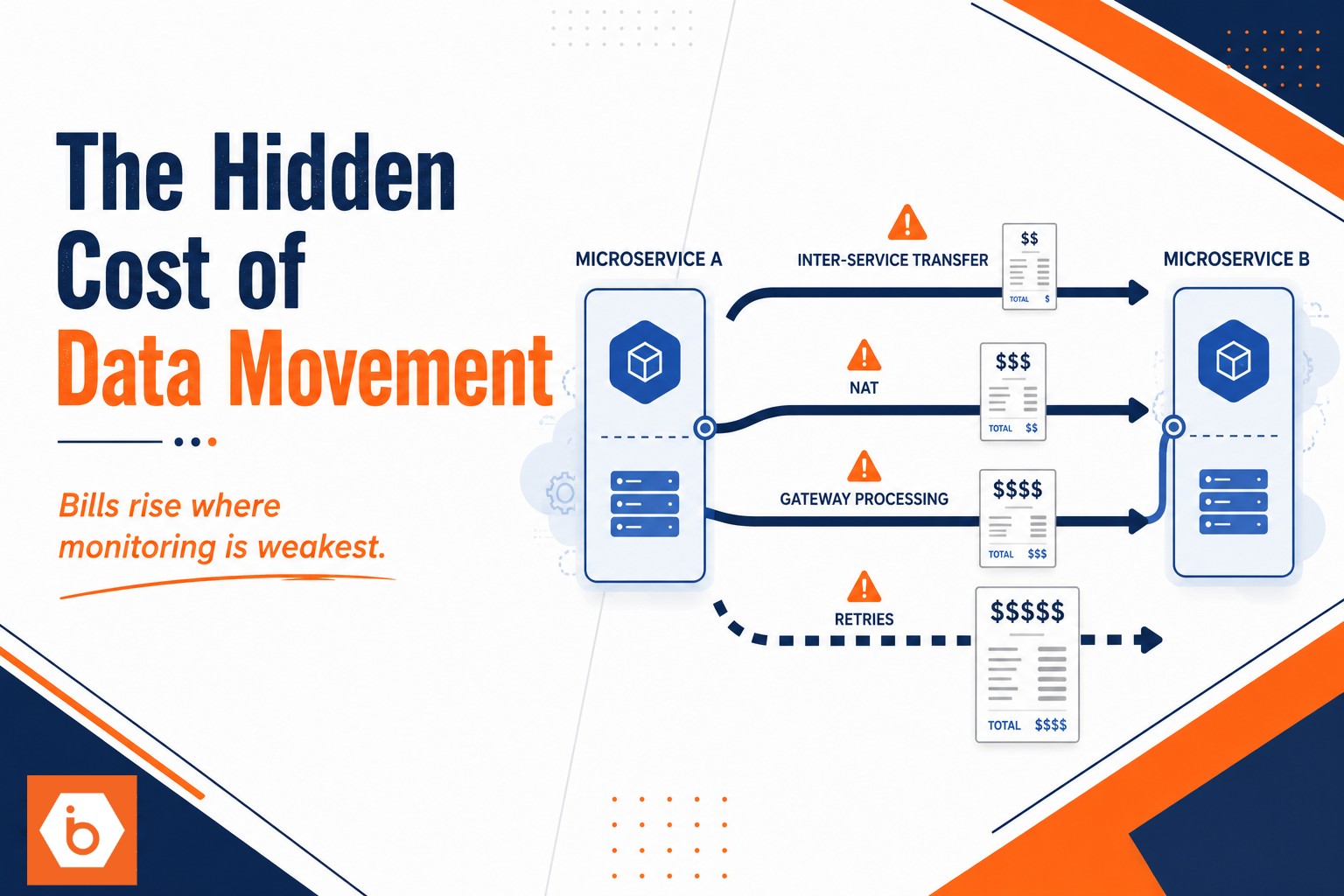
One more nasty detail: retries. If an external endpoint is flaky, your retry strategy turns “a few requests” into “a lot of bytes processed.” NAT doesn’t care that your app is “trying.” It charges for the traffic it forwards.
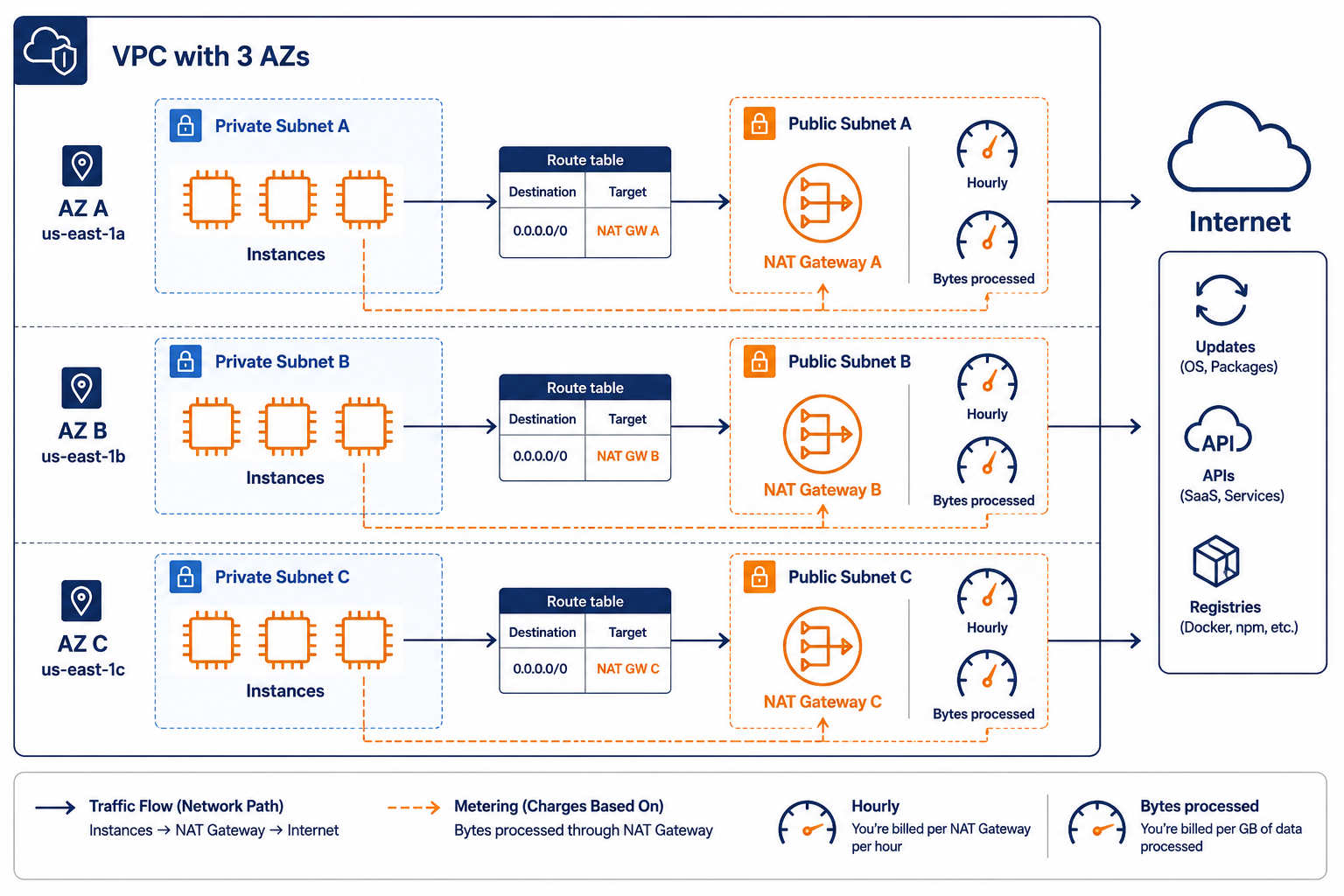
Shows how private instances route outbound traffic to NAT Gateways and where the cost scales.
What outbound traffic actually goes through NAT (your checklist)
You can’t fix NAT cost by “thinking about it.” You fix it by identifying what is generating outbound bytes and then stopping it from going to the public internet through NAT.
Start with these categories, because they show up in real systems:
Most teams first blame application code. Then they discover the real volume comes from platform plumbing. Node bootstrap scripts, package managers, and agent daemons are the usual sources.
You should also look for “chatty” background behavior that looks harmless in code reviews:
- OS and runtime updates during instance creation.
- Container image pulls during deployments and node autoscaling.
- Certificate revocation checks (OCSP/CRL) and other TLS validation chatter.
- Telemetry, monitoring, and log shipping to third-party endpoints.
- SaaS integrations, webhooks, and retry loops.
- DNS lookups and metadata calls that happen frequently.
The key trade-off: if you move these dependencies behind private connectivity, you reduce NAT bytes, but you add operational work. You need private endpoints, caching, or internal mirrors. That’s usually worth it, because NAT cost is often the largest line item once you scale.
If you run Kubernetes, node scaling is the multiplier. Every new node is a mini migration day. It repeats the same outbound work. If you run a CI/CD pipeline that triggers frequent rollouts, you create repeated bursts of outbound traffic.
And yes, even “small” traffic adds up. With enough instances, a few hundred requests per minute becomes gigabytes per day. NAT charges for the bytes processed, not for how “important” the calls were.
Measuring NAT Gateway spend without guessing
Guessing is how you end up with a bigger mess. Measure first, then optimize.
In AWS, use CloudWatch metrics for the NAT Gateway. You want bytes processed and the time correlation with events like deployments, autoscaling, and scheduled jobs. If you see bytes processed rising at the same time your node groups scale up, you’ve got a bootstrapping problem, not an application problem.
To connect bytes to instances, use VPC Flow Logs. Flow logs help you identify which internal sources are generating outbound connections that leave through NAT. You can then focus on the specific workloads or node groups.
A practical workflow:
- Pick a NAT Gateway and time window where costs are high.
- Pull CloudWatch metrics for bytes processed and active connections (where available).
- Correlate spikes with deployment timestamps, autoscaling events, and cron jobs.
- Use VPC Flow Logs to identify top source instances or ENIs making outbound connections.
- Classify destinations: package mirrors, registries, external APIs, telemetry endpoints.
Once you know the top destinations, you can make targeted changes:
- Add caching or internal mirrors for package repositories and container registries.
- Reduce retry aggressiveness for flaky endpoints.
- Ensure TLS validation behavior is not doing extra work unnecessarily.
- Route only required traffic through NAT and keep everything else internal.
This is also where you can avoid a common trap: “We’ll just reduce NAT Gateways.” If you reduce from three AZs to one, you might cut hourly cost, but you also reduce availability. You can do it safely only if you understand your failure modes and your architecture can tolerate it. Cost optimization without resilience planning breaks later.
Cost control strategies that actually move the needle
Optimization isn’t one trick. It’s a set of changes that reduce bytes processed, reduce NAT count, or both.
1) Reduce NAT count only when you can tolerate risk
If you currently run one NAT Gateway per AZ, dropping to fewer NAT Gateways can cut hourly cost. But you must ensure your private subnets still have a valid route during AZ issues and that your workloads can handle reduced egress availability.
Trade-off: fewer NAT Gateways can improve cost but reduce resilience. Don’t do this just because a dashboard looks scary.
2) Stop sending bootstrapping traffic through NAT
For Kubernetes and autoscaling, the biggest win is often to prevent “day 0” downloads from hitting the internet through NAT.
Common approaches:
- Mirror container images to a registry reachable without NAT (for example, internal registry or private endpoints).
- Use package caches in your AMIs or node images so instances don’t run full apt-get update and install flows on every scale event.
- Bake common dependencies into your base images. This reduces outbound traffic bursts caused by scaling.
Trade-off: you spend time maintaining images and mirrors. If you don’t, the “cost win” disappears and you just create new engineering work.
3) Route specific destinations differently
Not all outbound traffic needs the public internet. Some destinations can be reached via private connectivity, VPC endpoints, or internal services. If you can keep traffic inside AWS private routing, you bypass NAT processing entirely.
Trade-off: you need a network design that supports those paths. This is usually a one-time architecture effort, then it pays back repeatedly.
4) Control egress behavior in the app and agents
Agents and SDKs often retry with aggressive backoff defaults. If an endpoint is flaky, retries can multiply bytes processed.
Trade-off: you may need to tune timeouts and retry policies carefully so you don’t hide real failures.
5) Use a cost-driven review cadence (FinOps, but practical)
Most teams never revisit NAT after initial setup. Add a periodic review:
- Compare bytes processed week over week.
- Identify top talkers from flow logs.
- Tie changes to deployments and scaling events.
If you want one concrete number to motivate this: NAT cost can become the top line item when you scale autoscaling fleets and keep NAT gateways per AZ. One real pattern we’ve seen in enterprise platform work is that the cost driver flips from compute to egress during rollouts, because each rollout triggers fresh image pulls and dependency downloads.
If you’re also comparing infrastructure providers, IBEE’s approach is straightforward: flat pricing for predictable costs and no surprise tiered complexity. But you still need to design for egress reduction either way. NAT Gateway bills are just the symptom.
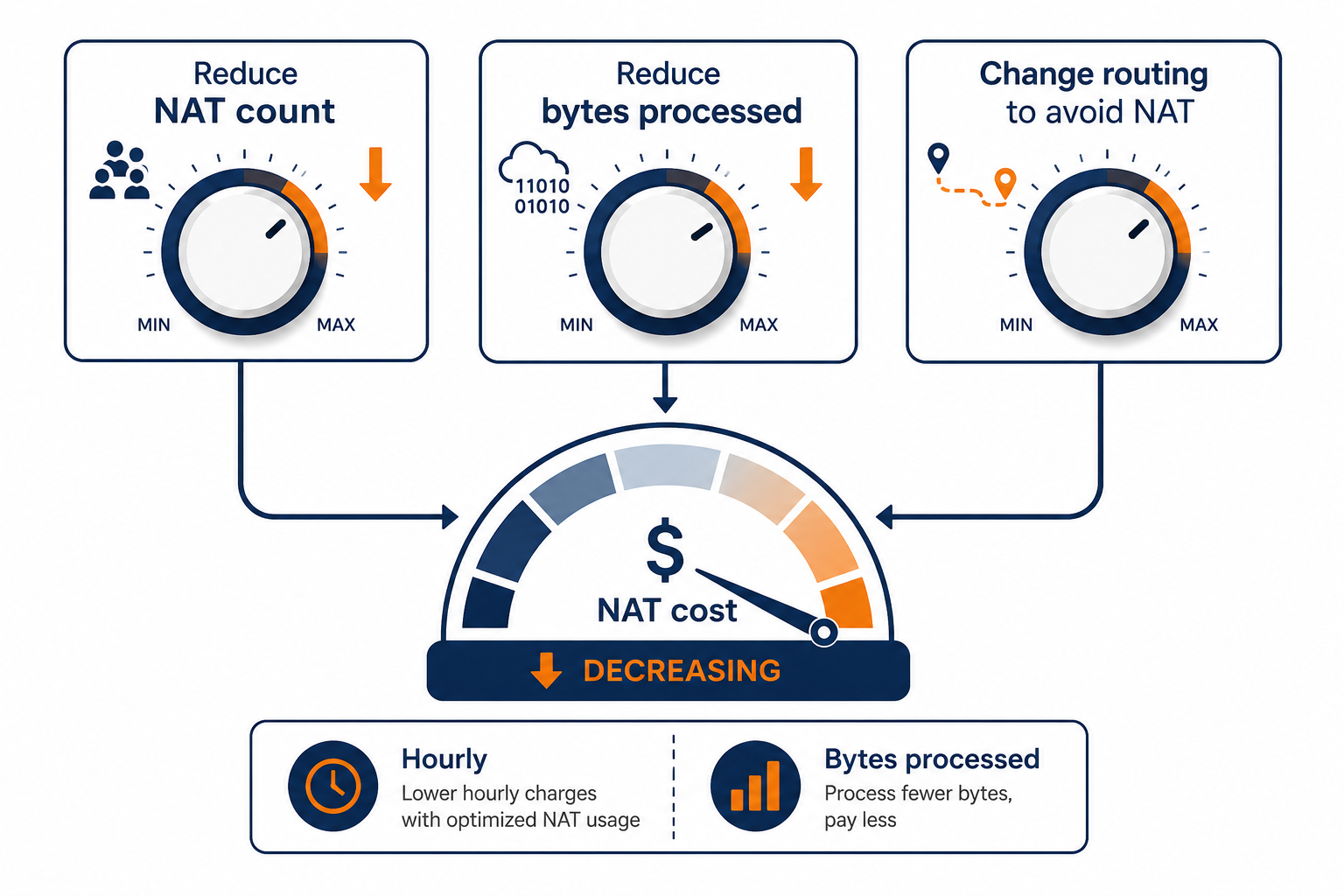
A compact map of the levers you can pull to cut NAT Gateway spend.
A real-world failure mode you can recognize fast
The migration took six weeks. Three of them were spent undoing a decision made in the first hour.
You know the decision: “We’ll put everything in private subnets with NAT for outbound.” It felt correct. It was also wrong for their workload.
What happened was boring and predictable. They scaled a Kubernetes cluster with multiple node groups across three AZs. Every rollout triggered node churn. Each new node performed package updates and pulled images from registries that were only reachable via public internet. So every deployment created a burst of outbound traffic through NAT.
The team tried to “optimize” the application first. It didn’t help because the bytes were dominated by bootstrap and background agents. Once they mirrored registries and baked dependencies into node images, the NAT bytes processed dropped sharply and stayed down. The bill finally matched their mental model.
Most teams get this wrong because they assume the NAT Gateway cost is proportional to user traffic. It isn’t. It’s proportional to all outbound traffic from private resources, especially churn.
Do this today: cut NAT bytes processed before you cut anything else
Your next step is simple and measurable:
- Pick the NAT Gateway with the highest spend.
- Pull CloudWatch bytes processed for the last 7 days.
- Identify the top 2 time windows with the largest spikes.
- Use VPC Flow Logs to find the top internal sources during those windows.
- For those sources, list the outbound destinations and categorize them into “updates and bootstrap,” “registries,” “third-party APIs,” and “telemetry.”
- Choose one change that targets the biggest category (for example, bake dependencies into images, mirror registries, or route a destination through private connectivity).
Do that once. Then you’ll stop arguing about architecture and start reducing bytes, which is the only lever NAT Gateway actually responds to.