
Most teams don’t “migrate storage.” They migrate pain.
The migration took six weeks. Three of them were spent undoing a decision made in the first hour: your team preserved the bucket name but changed the object key format. Suddenly your transcoder couldn’t find thumbnails, your CDN cache keys didn’t match, and your “simple cutover” turned into a scavenger hunt through logs at 2 AM.
Here’s the uncomfortable truth: most media upload pipelines fail during the boring parts. Key naming, multipart semantics, and event triggers. Not the API calls. Your application already knows how to upload bytes. It’s everything around the bytes that breaks.
What you’re actually migrating (and what you are not)
When you say “move from AWS S3 to IBEE Object Storage,” you are really changing four things, and only one of them is the storage API.
You are not redesigning your media pipeline. You should keep the same high-level flow:
Client uploads media to object storage (often directly via pre-signed URLs). Your system records metadata and triggers processing. Workers transcode, generate thumbnails, extract metadata. CDN serves the final assets.
What changes is where the upload goes, how you authenticate uploads, and how events trigger processing. Everything else should remain stable: object key conventions, content types, checksums, and the way your downstream services locate assets.
Most teams get this wrong when they treat “S3 compatibility” as a free pass. Yes, S3 API compatibility means SDK code can keep working. It does not mean your pipeline behavior stays identical. Two common gotchas:
First, ETag and checksum validation. If your client or backend assumes an ETag format that matches a specific S3 multipart behavior, you’ll see “successful upload” followed by “integrity failed” or “processing skipped.” Second, event timing and payload shape. If your processing trigger depends on the exact event message fields, the job won’t start, even though the object exists.
Your job is to make the storage swap invisible to the rest of the system.
Target architecture: keep the pipeline, swap the storage
Your safest migration strategy for media uploads is a phased cutover that keeps reads and processing stable while you change only the upload target and the storage endpoint.
You want these invariants during the move: Object keys stay exactly the same as in S3. Metadata stays in your database or metadata store with the same schema. Processing jobs keep the same inputs and output key patterns. Delivery keeps using the same CDN paths and cache strategy.
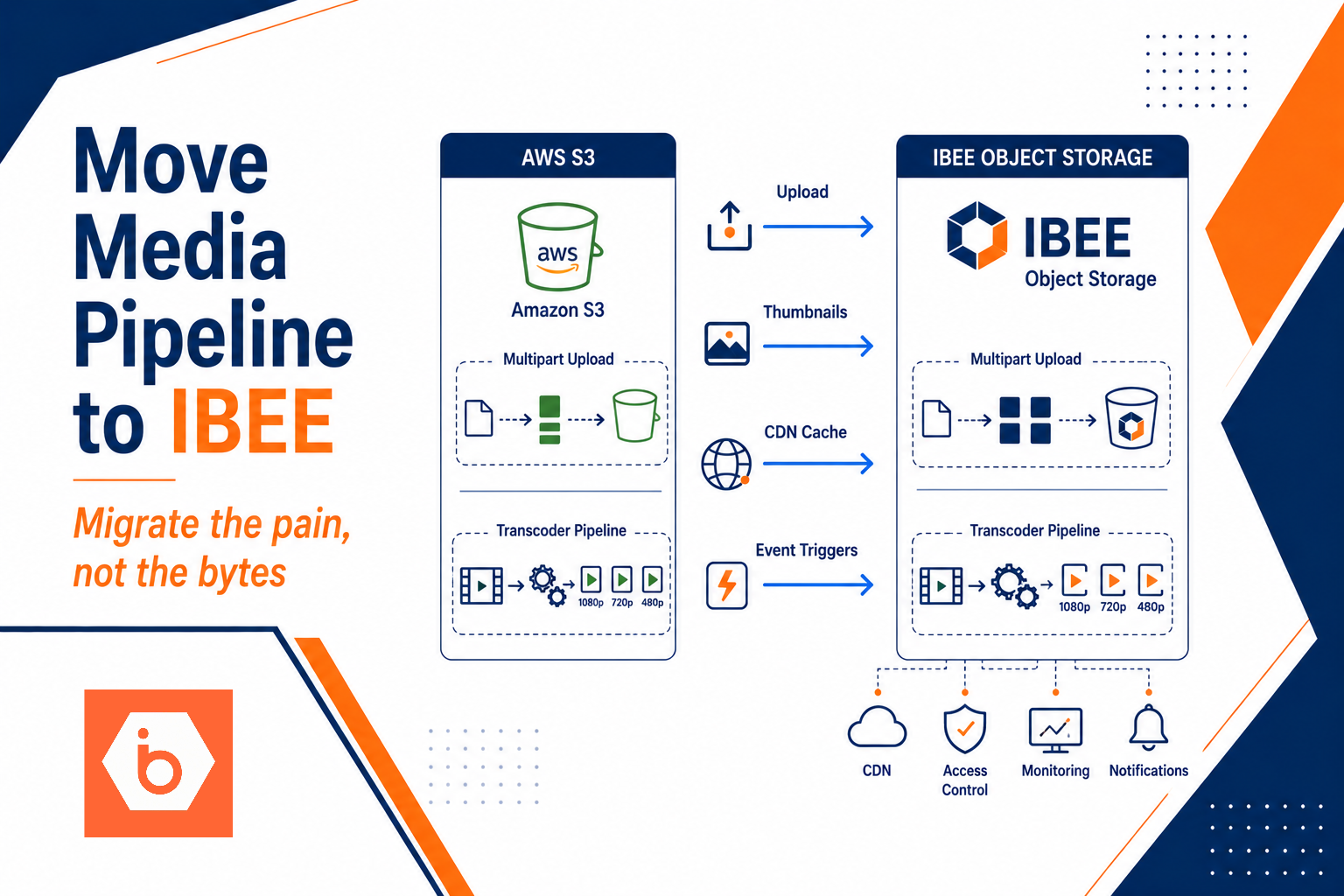
That means your backend still issues pre-signed upload URLs, but now those URLs point to IBEE Object Storage. Your processing trigger still reacts to “object created,” but now it listens to IBEE’s event mechanism (or you wire a bridge that publishes to your existing queue).
If you already use multipart uploads for large videos, keep that. Don’t invent a new upload method in the migration window. Multipart is where most “it worked in staging” bugs hide, because part sizes, completion calls, and retry behavior must match what your client expects.
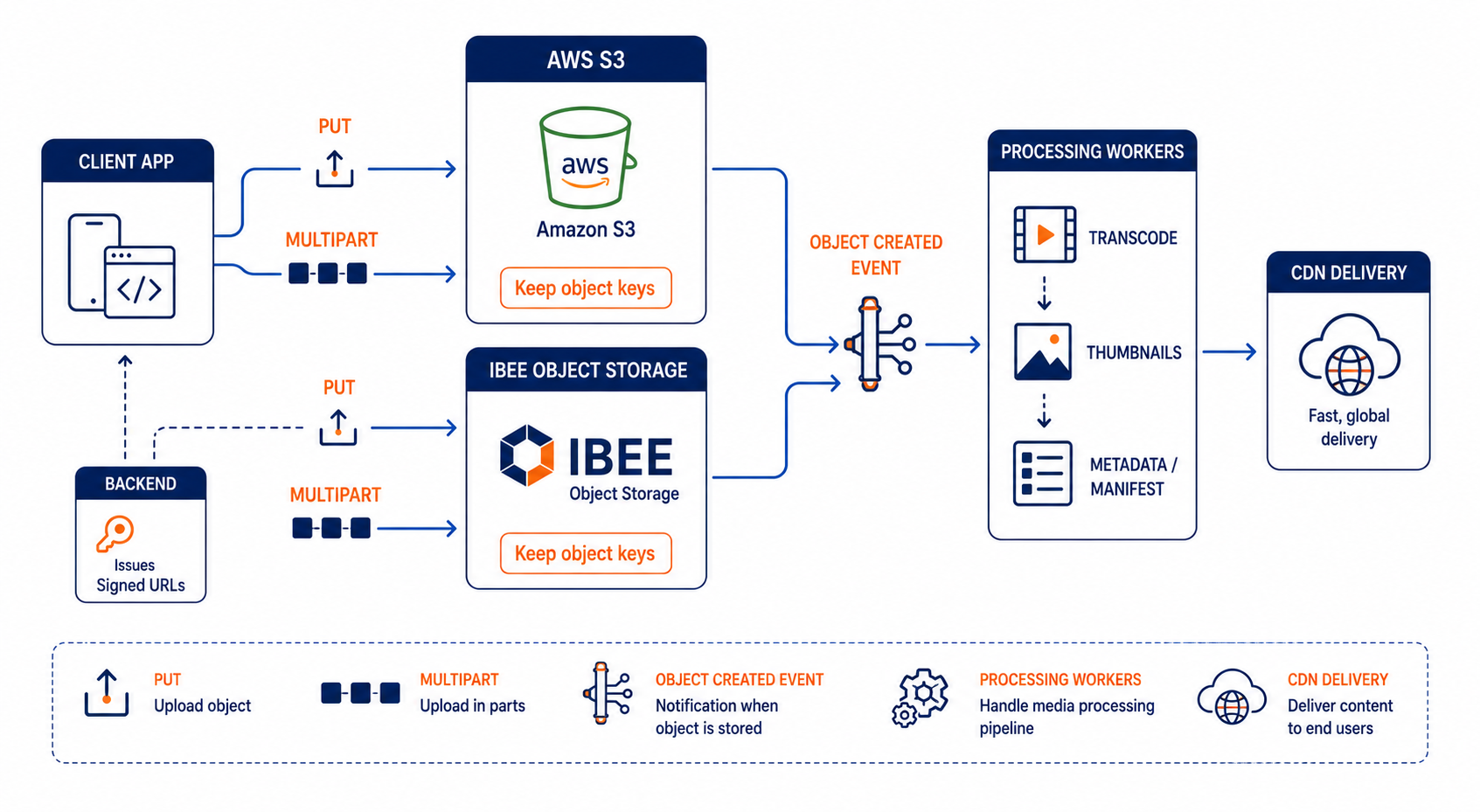
Shows direct-to-object-storage uploads, event-driven processing, and CDN delivery with AWS S3 replaced by IBEE during cutover
Step-by-step migration plan that doesn’t break production
You have three migration approaches: lift-and-shift, read-through, and big bang. For media pipelines, “big bang” is how teams end up with broken thumbnails and angry support tickets. Start phased.
1.Freeze the contract you depend on
Write down the exact object key format your pipeline uses today. Include examples for: user uploads (video and images) thumbnail keys derived assets (captions, waveforms, previews) any “status” marker objects you create during processing
Also write down the content rules: content-type values expected size limits whether you rely on ETag or checksums for validation
2.Provision IBEE buckets with matching behavior
Create equivalent bucket configuration: access policy model, lifecycle rules, and any retention requirements. The goal is not “same as AWS,” it’s “same behavior from the pipeline’s perspective.” If you expire objects in S3 after 30 days, do the same in IBEE or your processing will fail later.
3.Implement upload target switching behind a feature flag
Your backend endpoint that issues pre-signed URLs should support two targets: AWS S3 (control path) IBEE Object Storage (migration path)
During the first phase, route only new uploads to IBEE. Reads and processing should still use S3 until you validate that downstream jobs can find the objects by key.
4.Backfill carefully, not emotionally
Backfilling old objects is useful, but don’t assume you need 100% coverage on day one. Prioritize: recent uploads objects likely to be requested soon anything required to validate your transcoding pipeline end-to-end
If your platform uses database rows to decide what to process, backfill only keys referenced by those rows first.
5.Switch reads, then processing, then writes
A safe order: Phase A: Writes to IBEE, reads from S3 Phase B: Reads from IBEE for objects that exist there, fallback to S3 for missing keys Phase C: Processing triggers from IBEE events, outputs written to the same key space Phase D: Reads fully on IBEE, then decommission S3 writes
The point is to keep your system functioning even when objects exist in only one place.
6.Build a rollback that actually rolls back
Rollback for storage migrations is not “switch the flag.” It’s “restore the invariants.” If you route uploads to IBEE but your processing writes derived assets to a key namespace that downstream expects, you need to make sure rollback doesn’t strand derived assets.
At minimum, keep: the ability to re-issue pre-signed URLs pointing to AWS S3 a way to re-run processing for a set of keys a clear mapping of which keys were produced on which storage during the cutover window
Most teams get this wrong by skipping the re-run plan. You will need it. Media pipelines always produce edge cases: corrupted uploads, failed transcodes, and workers that crash after writing partial outputs.
Multipart uploads and integrity: the two places you must test like an adult
If you only test “upload small file works,” you will get burned.
Multipart uploads behave differently across systems, especially when you validate integrity. Your client or backend likely does one of these: compares a stored checksum to what the upload returns uses ETag as a proxy for integrity verifies content-length and reassembles parts based on part numbers
During migration, test: large video uploads that use multipart retries mid-upload (network drop, client abort, server timeout) resume behavior (do you restart parts or restart the whole upload) integrity verification path (does your code accept the returned value)
If your pipeline marks an upload “ready” only after integrity checks, you must ensure the checks pass on IBEE exactly the same way they did on AWS.
Also watch out for “silent success.” Some clients upload successfully but your processing trigger never fires. That’s usually event wiring, not storage.
Events and processing triggers: keep the job inputs stable
Your transcoding and thumbnailing jobs should not care where the object lives. They should care about: object key bucket/namespace identifier (if you pass it) content-type and size a “processing state” record you store in your DB
The migration failure mode looks like this: Upload works. Objects appear in the target storage. But your processing queue stays empty.
That means your event trigger is not emitting what your processor expects, or your processor expects a specific event payload schema and it no longer matches.
So treat event wiring as a first-class migration task. Validate it with an end-to-end test: Upload a known object key. Confirm the “object created” event reaches your queue. Confirm your worker picks up the job. Confirm it reads the object successfully. Confirm it writes derived assets back to the expected keys.
If you already have an event bus abstraction, use it. Don’t let the migration leak AWS-specific event shape into your processing code.
Cost and bandwidth: don’t guess, model the egress you actually pay
Storage migration is usually justified by cost, but you can’t justify it with “storage is cheaper.” For media platforms, bandwidth dominates.
Your cost model needs at least: monthly storage growth (GB) monthly egress for downloads and playback request volume (PUT/GET) if you have a lot of small assets
On IBEE Object Storage, pricing is straightforward: storage is ₹1.5/GB/month and egress downloads are ₹2/GB. In India, AWS S3 egress is around ₹6.75/GB, so the egress delta alone can be massive once you have real playback traffic.
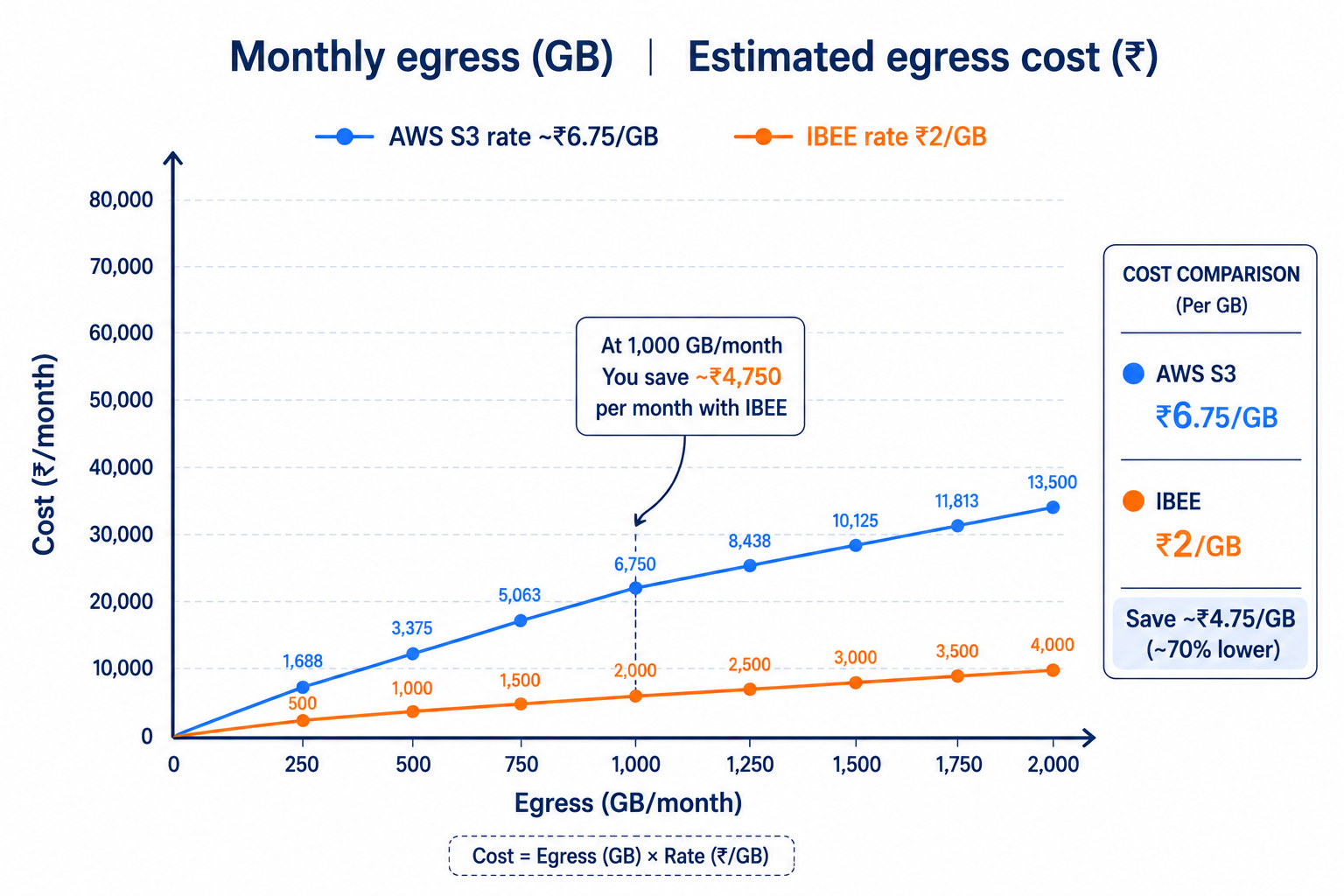
Compares egress cost growth as monthly download volume increases
One more blunt point: if you move storage but keep the same CDN configuration, you might not realize the savings you expected. Egress happens where it happens. Make sure your delivery path still routes through the CDN strategy you model.
If your team doesn’t already have a FinOps view of “GB downloaded per month,” you need to build it before you declare victory.
The operational checklist you should not skip
You’ll feel tempted to sprint through operations because “it’s just storage.” Don’t.
You need: a bucket naming and key convention that your pipeline code treats as immutable a tested upload path for both single PUT and multipart uploads event wiring validated end-to-end, not “event logs show it” a rollback plan that includes reprocessing keys a cost model tied to actual egress volume and request counts
If you do those, the migration becomes boring. That’s what you want.
Here’s the concrete action you can take today: pick one non-critical media type (for example, user profile images or low-volume thumbnails), implement dual-target pre-signed uploads with a feature flag, and run a full end-to-end test that includes upload, event trigger, processing, and CDN retrieval using the exact same object keys as your current S3 pipeline. Then repeat for one large multipart video. That sequence will surface the real failures before you touch your main traffic.