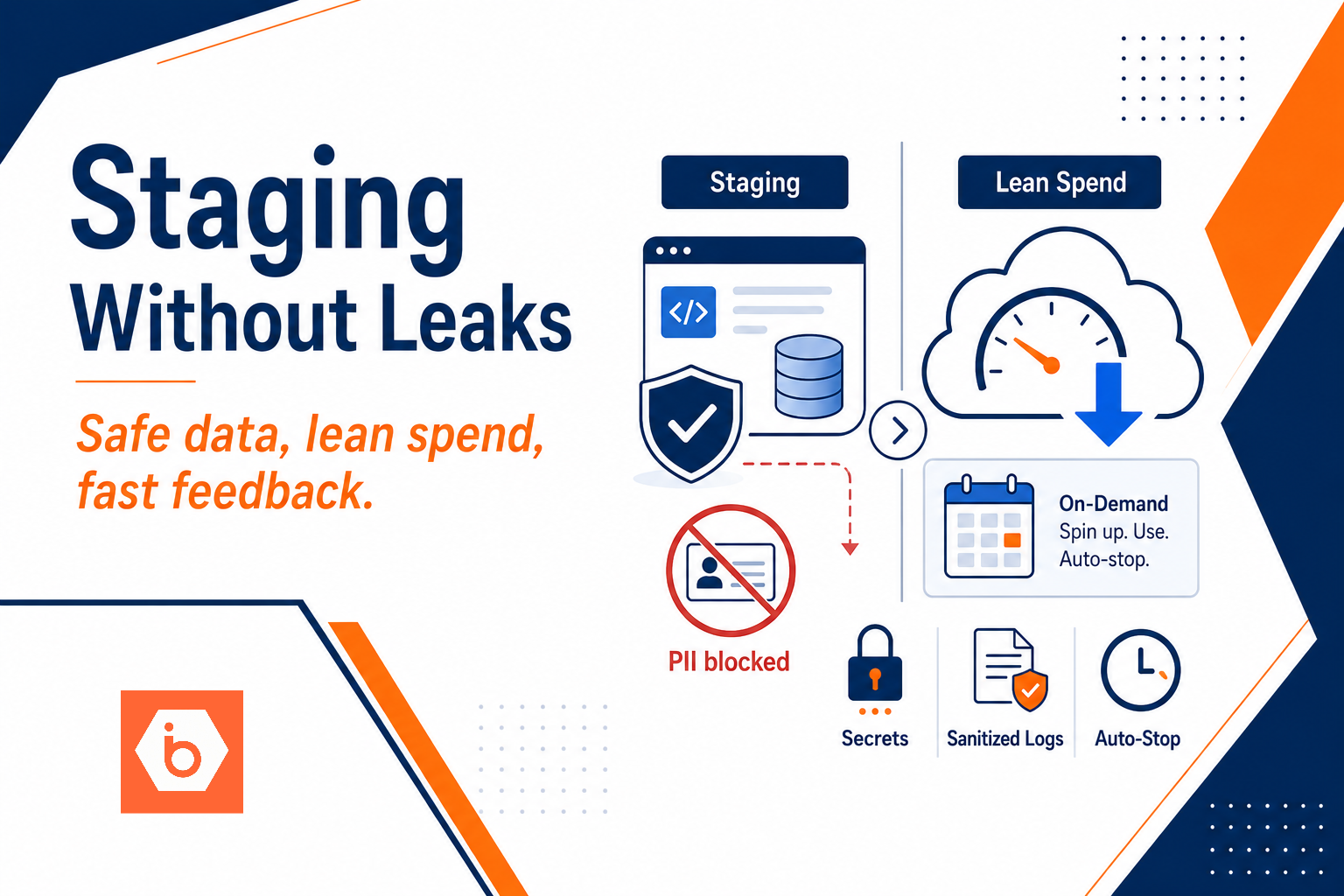

Most teams treat staging like a polite copy of production. Then the first incident hits: a developer dumps production PII into staging logs because “it’s just for debugging,” and finance finds out staging also ran full-time for two quarters.
The uncomfortable truth: you do not accidentally leak data or waste cloud spend. You leak and waste because you made staging part of the same security universe as production, and you made it “always on” because that felt easier than automation.
Let’s fix both, with an approach that your team can implement in weeks, not quarters.
The failure modes you must design out
Start by naming the ways staging goes wrong. If you do not, your design reviews will stay vague and your implementation will drift.
Most teams get this wrong when they reuse production secrets and endpoints. They point staging at production databases “read-only,” they reuse the same S3 bucket, they keep one shared logging sink, and they let CI/CD roles pull the same credentials as production. Then they add “sanitization” later. Too late. The leak already happened the first time someone ran a test with real request payloads.
Here are the concrete leakage paths that matter in staging:
Staging uses production credentials because the secret names match and the deployment templates are shared. Staging has network reachability to production subnets because someone allowed broad egress “for convenience.” Staging has IAM permissions that are “almost the same” as production, which is how cross-environment access becomes possible. Staging writes to production logs or error reporting because you used one tenant or one sink. Staging exports real production events to third-party integrations because the environment flag is wrong. Staging stores production-like datasets because “we need realism,” and nobody agreed on what realism means.
Now cost waste. Again, not accidental, just predictable:
Always-on compute fleets run even when nobody tests. Databases stay provisioned because “startup time is annoying.” Backups, snapshots, and log retention grow because nobody tied retention to environment purpose. Networking costs spike because staging generates egress to the wrong place, or because NAT gateways and cross-region calls run continuously. CI/CD rebuilds images and dependencies without caching, then keeps long-lived agents running.
Your job is to design staging so it cannot leak and so it stops spending when it stops being used.
A reference architecture that enforces isolation and controlled realism
You want staging to be a separate security domain, not a separate folder. The easiest way to do that is to separate accounts. If you cannot, separate VPCs and IAM namespaces, and enforce denies at resource level. But account separation is the cleanest control boundary.
The reference pattern below assumes you do have separate accounts and you treat staging data as sanitized by construction.
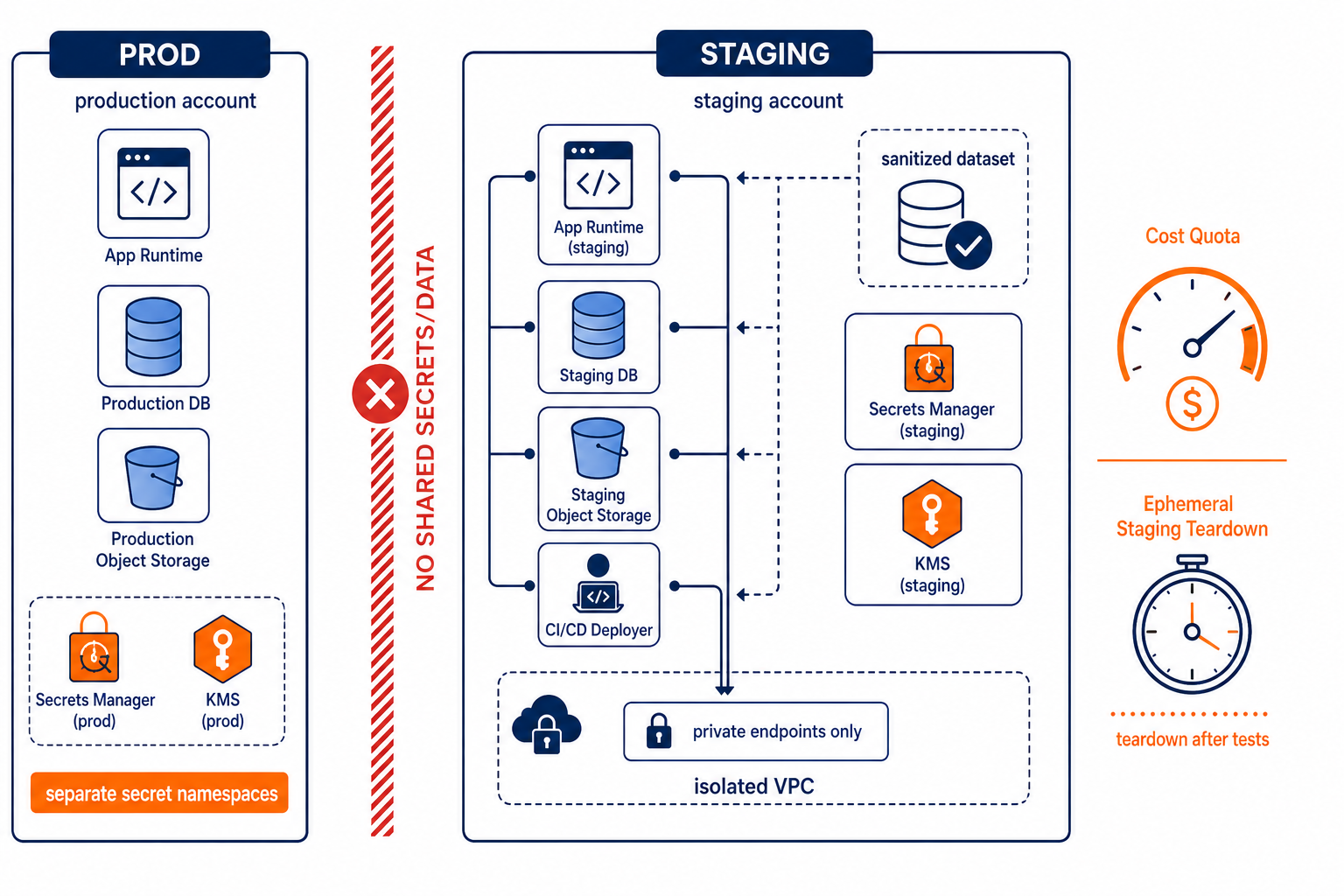
This shows how you block prod access while still testing production-like behavior in staging.
The pieces you need:
First, separate identity and secrets. Your staging runtime role must not be able to read production secrets. Use environment-specific secret namespaces and separate encryption keys. If you rely on “same secret key names,” you will eventually deploy staging with production access. Stop doing that.
Second, separate data planes. Staging gets its own database and its own object storage buckets. If you need object storage for artifacts, caches, or test fixtures, use staging-only buckets. Do not point staging at production buckets and “hope” nobody writes. If you must seed staging with realistic data, seed from a sanitized export pipeline that strips or tokenizes sensitive fields before it lands anywhere staging can access.
Third, isolate networking. Put staging in its own VPC. Then make the default path impossible: staging should not have routes to production private subnets. If staging must call a production dependency, do it through a tightly controlled allowlist using short-lived tokens and audited access, and minimize the data it sends.
Fourth, isolate observability. Use separate log sinks and separate error reporting projects per environment. Redaction only helps if it runs before sensitive fields reach storage. Separate sinks make it harder to accidentally persist secrets.
Fifth, make staging ephemeral by default. If staging exists per branch or per PR, teardown becomes a cost control and a security control at the same time. Every day a staging environment lives is one more day you might accidentally log something sensitive or let permissions drift.
Finally, enforce cost controls. You need quotas and schedules, not vibes. Right-size compute, cap autoscaling, and set hard limits for storage, backups, and egress. If your staging environment can run forever, it will. Finance will not accept “we forgot.”
This is also where your CI/CD pipeline design matters. Treat deployment as a privilege boundary. The CI/CD role that deploys staging should not have production permissions. Period.
Data sanitization that actually works under test pressure
Sanitization fails when teams treat it as a one-time transformation. It is not. You need a repeatable pipeline that produces staging-safe datasets every time you refresh.
There are three practical approaches, and you should pick one based on what your tests require.
If you only need correctness for business logic, use synthetic data. Generate shapes that match your schema and constraints, but with no real identifiers. Most teams overestimate how much realism they need.
If you need referential integrity, use tokenization or pseudonymization. Replace user identifiers with staging-only tokens. Keep relationships intact so joins still work. The key is reversibility. You should be able to map tokens back to real identifiers only in production, not in staging. Staging should not hold the reverse mapping key.
If you need production-like distributions, sample and filter. Take a small subset of production data that excludes sensitive fields, then apply row-level filters by sensitivity. Do not move full tables “just for a week.” Weeks become months.
Now logs and telemetry. Even with sanitized datasets, you can leak through request bodies, headers, and stack traces. Your app should implement field-level redaction at the logging layer. Then make sure your error reporting and APM agents are configured to avoid capturing request payloads by default in staging. Redaction is not a suggestion. It is a requirement.
One more trap: feature flags and environment variables. Most teams gate behavior with a single flag like ENV=staging and assume it means safe. It does not. You need explicit “staging safe mode” behavior: disable third-party calls that would send real customer data, force test payment providers, and prevent any code path that writes to production destinations.
You only get confidence when staging behaves like staging, not “production with a different URL.”
Cost control: stop provisioning what you do not need
Cost waste in staging usually comes from the same root cause: you built it like production. Production wants availability and performance. Staging wants feedback and isolation.
So you design staging for short-lived compute and right-sized storage.
Right-size compute first. If you run Kubernetes, do not keep an always-on cluster if you only need it during CI tests. Use scheduled scaling or ephemeral environments per branch. If you run VMs, stop them when idle and only start them for test windows. If you cannot stop everything, at least cap autoscaling and set minimums to near-zero.
Databases are the next biggest lever. Provisioning a full production-sized database for staging is how you get surprise bills. Instead, use a smaller instance for staging and consider read replicas only if you have a real need. Better: seed staging with sanitized snapshots and run migrations and tests against that, then refresh on a schedule.
Storage and backups quietly accumulate. Snapshots of staging volumes and long log retention can become your biggest line item even when compute is small. Set retention policies by environment. If staging exists for 24 hours, your log retention should not be 30 days. Also, separate storage classes for artifacts and test fixtures so you can expire aggressively.
Networking costs are often the hidden tax. Staging test runs that download large dependencies or move data across regions can rack up egress. Keep staging dependencies in the same region where possible, and avoid cross-region calls during tests. If you use object storage for artifacts or dataset fixtures, keep egress paths predictable.
If you want one rule that keeps teams honest: staging should have a teardown mechanism that runs automatically and a cost ceiling that fails fast. When the ceiling hits, the environment should stop or degrade in a controlled way, not keep running and billing.
Most teams get this wrong by adding dashboards after the fact. Dashboards do not stop spend. Quotas and teardown do.
CI/CD workflows that are safe to repeat and hard to misuse
Now the pipeline. If your CI/CD can deploy staging using the same credentials as production, you already lost.
Use separate service accounts or roles for each environment. Require explicit environment selection in the pipeline, and block production deploy jobs unless a human approval runs through your policy system. Make it impossible for staging jobs to fetch production secrets. That means your secret manager access policy must deny it, not just “not provide it.”
Also, make deployments repeatable. Use infrastructure-as-code so staging configuration matches what you intended, not what drifted. This prevents the “works on my staging” problem, which is usually caused by inconsistent flags, inconsistent IAM bindings, or inconsistent dataset refresh logic.
For artifacts and caches, store them in staging-specific object storage. Your build pipeline should write to staging buckets, and your runtime should read only from staging destinations. If you share caches across environments, you create a backdoor for accidental data persistence.
Finally, enforce environment parity where it matters. Do not chase perfect parity across every layer. Chase parity in the behaviors that affect correctness and security: auth flows, feature flag defaults, third-party integration behavior, and failure modes. If staging differs in those areas, you do not have “parity,” you have a confidence theater.
If you need a single practical example: set your staging to use a sandbox payment provider and block outbound calls to production customer endpoints. Your tests should fail loudly if someone toggles the wrong integration URL.
What to do today (one concrete action)
Pick one staging environment and run an access audit this afternoon.
- List every secret, database endpoint, object storage bucket, and logging sink your staging jobs use.
- For each, verify it belongs to staging only. If anything points to production, fix it now by swapping to staging-only resources.
- Add a hard “no production access” deny rule at the IAM level for the staging deploy role and the staging runtime role.
- Set an automatic teardown rule for that staging environment based on age or merge status.
- Set a cost quota or budget alert for staging so spend stops being a surprise.
If you want the fastest path: start with secrets and network reachability. Those two changes alone kill most real-world leakage, and they do not require you to redesign your whole platform.