

The Hidden Cost of a Waiting GPU
A GPU training a 7B parameter language model on an A100 processes roughly 2,000 tokens per second. At typical GPU rental rates in India of Rs.200 to 400 per A100-hour, every second of GPU idle time while the dataloader catches up costs money without producing any training progress.
GPU utilisation is typically monitored as the percentage of time the GPU is actively computing. A training job showing 60% GPU utilisation is not running at 60% efficiency: it is running at 60% of what you are paying for and wasting 40% of your GPU budget on wait time. The compute is provisioned. The bill is running. The GPU is sitting idle waiting for data.
The most common cause of low GPU utilisation in the early epochs of a training run is data loading latency. The GPU processes a batch, then waits for the next batch to arrive from the dataloader. If the dataloader cannot produce batches at least as fast as the GPU can consume them, the GPU idles. This guide covers how to diagnose this bottleneck and the five techniques that resolve it.
Diagnosing the Bottleneck
Before optimising, confirm that data loading is actually the bottleneck rather than a compute or memory constraint.
The first check is GPU utilisation. Running nvidia-smi in watch mode during training shows the GPU-Util percentage in real time. If GPU-Util is consistently below 90% during the forward and backward pass, the GPU has idle cycles that need to be explained.
The second check is dataloader timing. Adding timing instrumentation around the data loading step in the training loop, measuring the time from batch request to batch ready, will show whether the dataloader is the source of delay. If the time spent waiting for data is consistently more than 10 to 20 percent of the total step time, data loading is the bottleneck and not the model computation itself.
The third check is network I/O during training. Monitoring network throughput with a tool like nethogs or iotop during a training run will reveal whether network I/O spikes and drops in a pattern that correlates with the training loop pauses. A steady network I/O curve suggests prefetching is working. A spiking curve that drops to zero between batches means the training loop is blocking on object storage fetches.
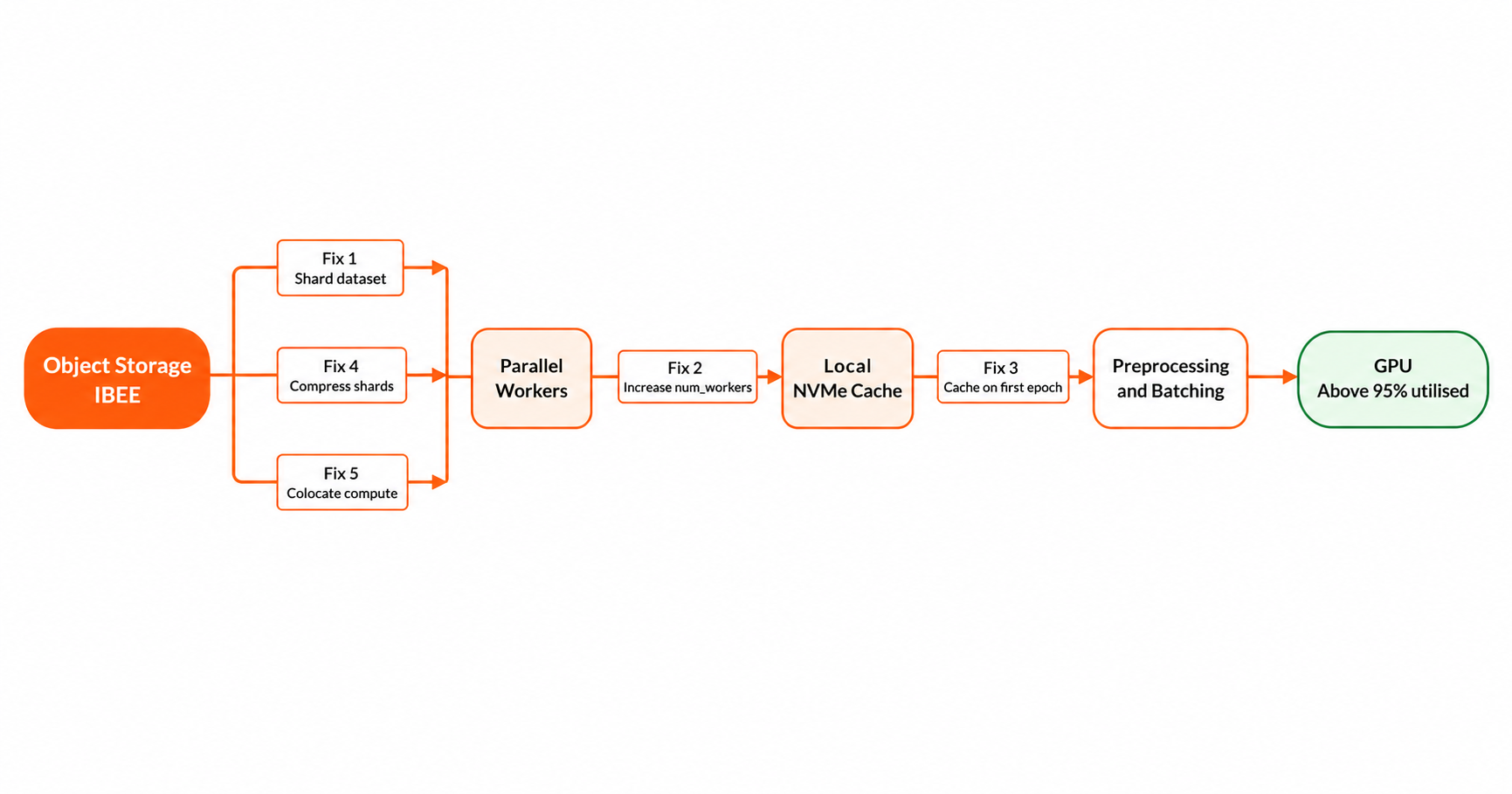
The path from storage to GPU has four places where latency accumulates. Each fix in this guide targets one of them.
Fix 1: Shard Your Dataset
Loading a dataset of one million individual image files from object storage means one million separate GET requests per epoch. Each GET request carries network overhead: the cost of initiating the HTTP connection regardless of how small the file is. For small files such as thumbnails, audio clips, and short text samples, this request overhead dominates total data loading time and is the single largest source of GPU idle time in image and audio training workloads.
WebDataset format solves this by packaging training examples into tar archives called shards, each containing hundreds or thousands of examples. Loading 1,000 shards of 1,000 examples each costs 1,000 GET requests per epoch rather than one million, a 1,000x reduction in request overhead with no change to the training examples themselves.
Creating WebDataset shards involves iterating over the source dataset and writing groups of matched sample files, for example an image and its label JSON, into a single tar archive per shard. Each shard is then uploaded to IBEE under the dataset prefix. During training, the WebDataset library reads shards from the S3-compatible endpoint by setting the AWS_ENDPOINT_URL environment variable to IBEE's endpoint. The DataLoader receives a stream of individual samples from the shard reader, exactly as if the files were local. The shard boundaries are invisible to the training loop.
Fix 2: Parallel Prefetching
The PyTorch DataLoader's num_workers parameter controls how many parallel worker processes load data. With num_workers set to zero, which is the default, data loading happens on the main process and blocks training. With num_workers set to eight, eight parallel processes prefetch data while the GPU processes the previous batch, so the next batch is ready the moment the GPU finishes the current one.
For WebDataset pipelines loaded from S3-compatible storage, each worker process opens its own independent connection to the storage endpoint. The parallel fetch requests saturate available network bandwidth more efficiently than a single sequential process, and the effective throughput scales roughly linearly with the number of workers up to the network bandwidth ceiling of the training instance.
Set num_workers to match the number of CPU cores available on the training instance as a starting point. During training, monitor CPU utilisation alongside GPU utilisation. If CPUs are underutilised while the GPU is idle, increase num_workers. If CPUs are at 100% and the GPU is still waiting, the bottleneck has shifted to CPU-side preprocessing and a different optimisation is needed.
Fix 3: First-Epoch Local Cache
For training runs that iterate over the dataset multiple times across multiple epochs, downloading all training shards to local NVMe storage on the first epoch and serving subsequent epochs from local disk eliminates the network dependency after the initial download.
Local NVMe throughput of 1 to 3 GB per second means the dataloader can feed the GPU faster than most GPU compute budgets can consume data, regardless of batch size or model size. The GPU never waits for network I/O after the first epoch completes.
The implementation is a prefetch step at the start of training that downloads all shards to a local cache directory in parallel, then switches the DataLoader's data source from the S3 endpoint to the local path for all subsequent epochs. The download is a one-time cost per training run per dataset version. If the dataset version changes, the cache is invalidated and the first epoch downloads the new shards.
Fix 4: Compressed Shards for Network-Limited Environments
When network bandwidth between the training instance and storage is the binding constraint rather than request count, compressing shards before upload reduces the bytes transferred per shard. WebDataset supports .tar.gz compressed shards natively: the library decompresses on the fly during reading with no change required in the training loop.
The tradeoff is that decompression adds CPU time per shard. If the training instance has spare CPU capacity and network bandwidth is the bottleneck, compressed shards reduce transfer time by more than they increase decompression time, which is a net improvement in data loading throughput. If CPUs are already at full utilisation from preprocessing and augmentation, the added decompression load can shift the bottleneck from network to CPU, making uncompressed shards the better choice.
Monitor CPU utilisation when switching between compressed and uncompressed shards. The right choice depends on the specific instance type and network path, not on a general rule.
Fix 5: Storage Colocation with Compute
The lowest-latency configuration is to run training jobs on compute instances in the same data centre or network region as the object storage. Network round-trip times within a data centre are sub-millisecond. Cross-region or cross-provider paths add 10 to 100 milliseconds to every object fetch, which accumulates across millions of requests per epoch into significant GPU idle time.
For training on IBEE object storage, running training jobs on compute instances within IBEE's Indian infrastructure or within the same Indian network region eliminates the latency component of each fetch entirely. The remaining overhead is the request initiation cost, which is addressed by sharding as described in Fix 1.
Combining the Fixes
The optimal configuration for production training from S3-compatible object storage combines all five fixes into a two-phase workflow.
In the first epoch, shards are downloaded from IBEE to local NVMe using parallel DataLoader workers, with compressed shards if network bandwidth is the constraint. WebDataset reads shards from the local cache as they arrive, so training begins processing the first batches before the full dataset is downloaded.
From the second epoch onwards, all shards are served from local NVMe. Network I/O drops to zero. GPU utilisation rises above 95%. The training run is fully decoupled from storage network performance for all remaining epochs.
The initial download is a one-time investment per dataset version. The GPU compute budget from the second epoch onwards is spent entirely on training progress.