For DevOps engineers and engineering leads who use GitHub Actions, GitLab CI, or Jenkins and want to integrate S3-compatible storage for artifacts and deployments.
What Object Storage Does in a CI/CD Pipeline
A CI/CD pipeline produces data at multiple stages: dependency caches that speed up subsequent runs, build artifacts that represent deployable versions of the application, test reports and coverage data, Docker image layers, and deployment packages. Most CI/CD platforms provide built-in artifact and cache storage, but built-in storage has three limitations: capacity constraints, no long-term retention control, and per-minute pricing that makes large artifacts expensive.
Object storage, specifically IBEE's S3-compatible API, provides unlimited capacity, full lifecycle control, and per-GB pricing that scales linearly with actual usage. For teams running dozens of daily builds with large artifact outputs, the cost and control advantages are significant.
Most teams we speak to hit the built-in limits at an awkward moment: midway through a release, when a large Docker layer or a fat test report pushes them past the platform's free tier. Switching to object storage at that point is the right call, but doing it under deadline pressure is unpleasant. The teams that set it up from the start never have that conversation.
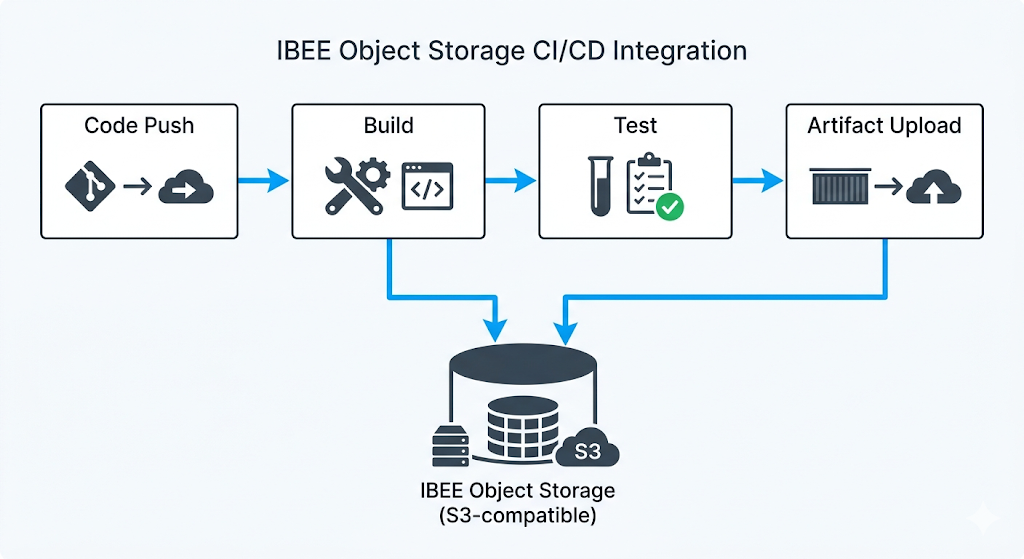
Object storage sits at three points in a typical pipeline: dependency cache on pull, artifact upload on build, and deployment sync on release.
GitHub Actions: IBEE Integration
GitHub Actions does not have a native S3-backend artifact action, but the AWS CLI and any S3-compatible tool work within workflow steps using environment variables.
Provider configuration via environment
Set these at the workflow or job level. When AWSENDPOINTURL is set, both the AWS CLI and AWS SDK route all S3 calls to IBEE.
[CODE BLOCK: GitHub Actions environment variables for IBEE endpoint, access key, secret key]
Uploading build artifacts
Using the first 8 characters of the commit SHA as a version identifier gives each build a stable, unique artifact location that correlates directly to the code that produced it.
[CODE BLOCK: GitHub Actions step to upload build artifacts to IBEE using commit SHA as key]
Dependency cache with IBEE
GitHub Actions' native cache action uses GitHub's cache storage. For teams who want their caches on IBEE, either for cost control or to avoid GitHub cache size limits:
[CODE BLOCK: GitHub Actions cache step using package-lock.json MD5 hash as cache key, storing on IBEE]
The MD5 hash of package-lock.json as the cache key ensures the cache is invalidated when dependencies change and reused when they have not. In practice this cuts cold build times by 40 to 60 percent on Node.js projects with large dependency trees.
GitHub Actions: Static Site Deployment to IBEE
The complete workflow for deploying a static site or SPA to IBEE on every push to main:
[CODE BLOCK: Full GitHub Actions workflow for static site deployment to IBEE on push to main]
The two-step sync strategy deploys hashed JS/CSS assets with immutable caching, then HTML files with no-cache headers. The delete flag on the HTML step removes stale files from the bucket.
One thing worth noting: if your deployment job fails halfway through, the hashed assets are already live but the HTML has not updated yet. This is intentional. Users on the old HTML still get the old assets. The new HTML only goes out when the full asset sync is confirmed complete. It is a simple atomic-enough strategy for most teams without needing a full blue-green setup.
GitLab CI: IBEE Integration
GitLab CI uses the same environment variable pattern. Set your IBEE credentials as masked CI/CD variables in your project settings, then reference them in your pipeline config.
[CODE BLOCK: GitLab CI pipeline config with IBEE environment variables and artifact upload step]
The advantage of masked variables in GitLab is that your IBEE credentials never appear in job logs even if someone accidentally echoes them in a script step. Set them once at the project or group level and every pipeline inherits them.
Artifact Retention With Lifecycle Policies
CI/CD artifact buckets grow silently without lifecycle policies. A team running 30 builds per day, each uploading 200 MB of artifacts, generates 6 GB per day and 180 GB per month in artifact storage. Without expiry, this accumulates indefinitely.
Apply a lifecycle policy to expire build artifacts after 30 days, or however many days your incident response and rollback policy requires:
[CODE BLOCK: AWS CLI or JSON lifecycle policy to expire objects in artifacts/ prefix after 30 days, pointed at IBEE endpoint]
Apply this via the AWS CLI pointed at IBEE, or manage it in Terraform. The 30-day window covers the full rollback horizon for most teams. If your compliance or incident policy requires longer retention, adjust the expiry days accordingly before applying.
We have seen teams skip this step and discover six months later that their artifact bucket holds 800 GB of builds nobody will ever roll back to. The storage cost is not catastrophic, but it is entirely avoidable.
Rollback Using Artifact History
With artifacts stored by commit SHA on IBEE, rolling back to any previous build is a one-command operation:
[CODE BLOCK: AWS CLI command to download a specific artifact by commit SHA from IBEE and deploy it]
The artifact history on IBEE, retained for 30 days, covers the full rollback window for typical deployment workflows. The key discipline is naming consistency: if every build uploads to the same prefix pattern with the commit SHA as the version identifier, any engineer on the team can perform a rollback without needing to know internal build system details. The commit SHA is visible in Git, in your deployment logs, and in your incident timeline.

At 180 GB per month of artifact storage, the difference between built-in platform storage and IBEE object storage becomes significant for teams running frequent large builds.